How to Create Stunning Digital Artwork Using Simple Tools
In the digital age, creating captivating artwork no longer requires expensive gear or advanced software. Whether you're an aspiring artist, hobbyist, or simply someone looking to express creativity, digital art presents boundless opportunities. The beauty of digital artistry lies in its accessibility—simple tools, some readily available on smartphones and inexpensive devices, empower anyone to produce visually striking pieces. This article explores how to harness these straightforward resources while developing techniques to elevate your work. From understanding the basics of digital art to fine-tuning your creative process, you’ll learn practical tips to craft stunning digital images without overwhelming complexity. Whether you’re sketching, painting, or editing photos, this guide will inspire and equip you to make art that resonates, using tools that won’t drain your wallet or technical confidence.
- Understanding Digital Art and Its Possibilities
- Choosing the Right Simple Tools for Your Needs
- Setting Up Your Workspace Efficiently
- Learning the Basics of Digital Drawing
- Exploring Color Theory and Palettes
- Mastering Brush Settings and Effects
- Utilizing Layers and Masks for Precision
- Incorporating References and Inspiration
- Enhancing Art Through Simple Editing Techniques
- Sharing Your Digital Artwork Confidently
- Practicing Consistently and Embracing Mistakes
- Expanding Skills Gradually Beyond Simple Tools
- Conclusion: Unleashing Creativity with Simplicity
- More Related Topics
Understanding Digital Art and Its Possibilities
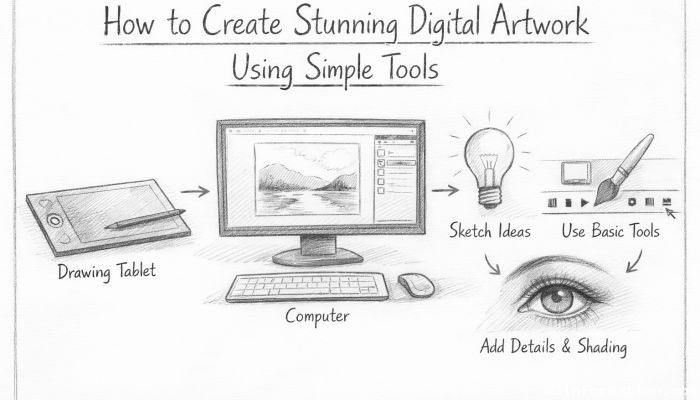 Digital art encompasses a wide range of creative expressions produced or enhanced through digital technology. Unlike traditional media—like pencils, paint, and canvas—digital art allows artists to experiment freely without physical constraints. The tools vary from dedicated drawing tablets to simple applications on smartphones and computers. Simple tools often include free or low-cost software like Krita, MediBang Paint, or even MS Paint, alongside basic hardware such as a mouse or a budget-friendly stylus. Grasping the versatility of digital art helps set clear expectations and motivates beginners by revealing how even modest setups can yield impressive results.
Choosing the Right Simple Tools for Your Needs
Selecting tools depends largely on your goals, budget, and the platform you’re comfortable using. If you prefer drawing by hand, a basic graphics tablet and a free program might suffice. For casual creatives, apps like Procreate Pocket (for iOS) or Autodesk SketchBook provide intuitive interfaces packed with essential features. On the desktop, software like GIMP and FireAlpaca offer powerful functions without complexity or cost. Don’t worry about premium features initially; focus on mastering fundamental brushes, layers, and color controls. The right tool optimizes your workflow, reduces frustration, and encourages the habit of consistent practice.
Setting Up Your Workspace Efficiently
A clutter-free, ergonomic workspace impacts your creativity and comfort. Even simple tools require proper setting to maximize effectiveness. Arrange your computer or tablet so your arm moves fluidly without strain. Minimize distractions by choosing a quiet area, park your phone if possible, and organize your files logically to avoid hunting down resources mid-project. Consider controlling ambient light to reduce screen glare, and use headphones or background music if it helps your flow. Consistency in your setup encourages focused sessions, improving both productivity and the quality of your artwork.
Learning the Basics of Digital Drawing
Begin with grasping core digital drawing principles such as line weight, shape construction, and basic anatomy if you’re drawing characters. Many simple programs mimic traditional brushes with adjustable thickness and opacity. Practice freehand sketching digitally to build coordination between your hand movement and the cursor or stylus. Layer management is crucial; learn to separate elements on different layers (e.g., sketch, line art, coloring) so you can adjust without affecting the entire artwork. Remember, digital drawing enables the undo function—use it smartly but avoid overdependence to improve your confidence over time.
Exploring Color Theory and Palettes
Color breathes life into digital art. Understanding color theory—how colors interact, contrast, and harmonize—is essential, even with basic tools. Start with a limited palette to simplify decision-making and develop a cohesive look. Use online resources or app presets to experiment with complementary, analogous, or monochromatic schemes. Simple digital art software allows you to create and save custom palettes, making consistent color application easier. Additionally, employ gradients and blending modes to add depth and mood, enhancing the emotional impact of your piece without intricate setups.
Mastering Brush Settings and Effects
Even simple programs provide multiple brush textures and settings that influence the style of your artwork. Experiment with brush hardness, opacity, and flow to simulate pencils, ink, or soft paint. Some brushes respond to pressure sensitivity if you have a compatible stylus—this feature can create more dynamic lines and shading effortlessly. Understand how layering strokes and changing brush size affect your piece’s composition. Playing with effects like smudge, blur, and eraser tools can add realism or stylization that transforms basic shapes into vibrant art.
Utilizing Layers and Masks for Precision
Layers are a digital artist’s best friend. They separate different elements—backgrounds, characters, highlights—allowing independent adjustments. Simple tools include options to rename, reorder, and change layer opacity, which helps in fine-tuning your artwork’s details. Masks provide non-destructive editing options by hiding or revealing parts of a layer without deleting them. Learning to use layers and masks skillfully increases your flexibility and encourages experimentation, helping avoid irreversible mistakes and boosting creative freedom.
Incorporating References and Inspiration
Creating digital art is more than technical skill; it’s creative storytelling. Use photo references for anatomy, perspective, or lighting to ensure accuracy and believable details, especially when working with simple tools where manual adjustments are frequent. Inspiration can come from everyday life, social media, art communities, or nature. Many artists use mood boards or digital scrapbooks to collect ideas and improve their compositions. Balancing originality with referencing not only elevates skill but also helps avoid artist’s block.
Enhancing Art Through Simple Editing Techniques
Post-processing isn’t reserved for professional-grade tools. Simple software features such as cropping, resizing, and hue/saturation adjustment allow you to refine final artwork. Adding simple filters or tweaking brightness/contrast can dramatically affect the atmosphere and clarity. Don’t overlook the value of composition adjustments—straightening a horizon or balancing symmetry can improve an otherwise average piece. These subtle edits polish your art for sharing on social media, portfolios, or print.
Sharing Your Digital Artwork Confidently
The digital world facilitates immediate sharing and feedback, which is vital for growth. Once satisfied with your creation, save it in common formats like PNG or JPEG for versatility. Establish a presence on platforms such as Instagram, DeviantArt, or Behance, where supportive communities thrive. Sharing work not only boosts motivation but invites constructive critique that hones your skills. Simple tools can produce professional results if combined with proactive engagement and continual learning.
Practicing Consistently and Embracing Mistakes
Creating stunning digital artwork demands patience and persistence. Set achievable goals, such as daily sketches or weekly projects, to build momentum. Accept mistakes as part of the learning curve, using rejection or imperfect results as lessons rather than setbacks. Consistency improves muscle memory and familiarization with digital tools, making techniques feel natural over time. Celebrate small victories to prevent frustration and keep your creative passion alive.
Expanding Skills Gradually Beyond Simple Tools
While simple tools create excellent pathways to digital art, growth often leads to exploring more advanced options. As confidence rises, try experimenting with different brushes, 3D modeling basics, or animation capabilities. Learning keyboard shortcuts, customizing interfaces, or incorporating new apps keeps your process efficient and exciting. This gradual expansion ensures you won’t feel overwhelmed but remain challenged and inspired to produce increasingly sophisticated work.
Conclusion: Unleashing Creativity with Simplicity
Creating stunning digital artwork using simple tools is not only possible, it’s a rewarding journey accessible to everyone. By choosing appropriate tools, setting up a supportive environment, and learning fundamental techniques such as drawing, color theory, and layer management, you build a strong artistic foundation. Embracing references, practicing consistently, and sharing your progress fuels both skill development and confidence. Remember, the power of digital art lies in its flexibility—simple doesn’t mean basic or inferior; rather, it invites innovation within reach. With patience and passion, anyone can transform modest resources into remarkable, expressive digital masterpieces. So pick up your stylus, open your favorite app, and start creating today—your stunning digital art awaits.
 Big O Notation Explained for Beginners
 AI in Gaming: Smarter NPCs and Environments
 Understanding Bias in AI Algorithms
 Introduction to Chatbots and Conversational AI
 How Voice Assistants Like Alexa Work
 Federated Learning: AI Without Sharing Data