A Beginner’s Guide to Working with APIs
Are you intrigued by the idea of connecting two pieces of software? Have you heard of an Application Programming Interface, or API, but aren’t quite sure what it is or how to use it? In this beginner’s guide, we’ll explore the world of APIs and provide you with all the knowledge you need to get started. We’ll explain what an API is, how it works, and discuss different types of APIs you’ll come across. We’ll also touch on practical aspects like reading documentation, understanding authentication, and using tools for testing APIs. By the end of this guide, you’ll have the foundation to confidently integrate APIs into your projects and unlock the power of digital connectivity.
- What is an API?
- Types of APIs
- How APIs Work: The Basics
- Reading API Documentation
- Understanding Authentication with APIs
- Tools for Testing APIs
- Making Your First API Call
- Working with JSON Data
- Handling Errors and Rate Limiting
- Integrating APIs into Your Projects
- Securing Your API Usage
- Exploring Popular APIs for Beginners
- Conclusion
- More Related Topics
What is an API?
API stands for Application Programming Interface. It is a set of protocols, routines, and tools that allow different software applications to communicate with each other. APIs specify how software components should interact, enabling them to exchange data and services efficiently. They act as an intermediary layer, abstracting the underlying implementation details, which helps in building modular and scalable systems. In essence, APIs facilitate interactions between different pieces of code, often over a network, without requiring developers to understand the internal workings of each component.

Types of APIs
There are several types of APIs, each with its own characteristics and use cases. Open APIs, also known as External APIs, are publicly available and can be accessed by anyone with internet connectivity. These APIs are designed to be exposed to external developers and are often used in web services and platforms. Partner APIs are typically shared between trusted business partners and may require authentication or licensing. Internal APIs, also known as Private APIs, are meant for use within an organization and are not exposed to the public. They are used to connect various internal systems, applications, or services, providing integration and automation within a company.
How APIs Work: The Basics
APIs work on the principle of making requests and receiving responses. A client application, like a web browser or mobile app, sends a request to a server, which hosts the API. The request is often made over the Hypertext Transfer Protocol (HTTP), using various methods such as GET, POST, PUT, DELETE, etc., each serving a specific purpose in the interaction. The server processes the request, performs the necessary actions or data retrieval, and sends a response back to the client. The response is usually in the form of data formatted in JSON (JavaScript Object Notation) or XML (Extensible Markup Language). By following a structured protocol and using standardized data formats, APIs allow seamless communication between different software components.
Reading API Documentation
Before starting to code with an API, it’s essential to read its documentation. API documentation is a guide that provides details on how to use the API effectively. It typically includes information about the available endpoints, request parameters, response formats, authentication methods, error codes, rate limits, and example requests and responses. Well-documented APIs can save developers hours of work, allowing them to understand the capabilities and limitations of the API and how to interact with it properly. Reading the documentation helps you avoid common mistakes and ensures a smoother development experience when working with the API.
Understanding Authentication with APIs
Authentication is a security measure used to verify the identity of users or applications accessing an API. Most APIs require some form of authentication to ensure that only authorized users or clients can access their data and services. Common API authentication methods include API keys, OAuth tokens, and JSON Web Tokens (JWT). An API key is a simple alphanumeric string that you include in your API requests to identify yourself. OAuth is a more advanced authentication protocol that allows users to grant access to their data without sharing their credentials, commonly used in social media APIs. It’s important to understand the authentication method an API requires and how to securely store and transmit your credentials when using an API.
Tools for Testing APIs
Testing is a crucial part of working with APIs, and there are tools available to simplify the process. Tools like Postman, Insomnia, and cURL enable you to send requests directly to the API and inspect the responses, without writing any code. These tools provide user-friendly interfaces for constructing requests, including specifying endpoints, parameters, and headers. You can then send the request to the API and analyze the returned data. Testing tools are invaluable for understanding API behavior, debugging issues, and experimenting with different request configurations before integrating the API into your application.
Making Your First API Call
To make your first API call, you typically need to know the endpoint URL and the HTTP method to use, such as GET, POST, PUT, or DELETE. For instance, if you want to fetch a list of users from a RESTful API, you may send a GET request to the endpoint URL, like `https://api.example.com/users`. Tools like Postman or programming languages with HTTP libraries, such as Python with the requests module, can help you make this API call. Writing minimal code to send the request, you can test the API and observe the response data, often in JSON format. Taking small steps and starting with simple API calls is a great way to build your confidence and understanding of the request-response pattern.
Working with JSON Data
JSON (JavaScript Object Notation) is the most popular data format for APIs, as it’s lightweight, easy to read, and language-independent. When working with APIs, you’ll often receive data in JSON format, which represents structured data as nested key-value pairs and arrays. To work with JSON data, you need to know how to parse and manipulate JSON objects in your programming language of choice. For example, in Python, you can use the built-in `json` library to load a JSON string into a Python dictionary and access its values. JSON is ubiquitous in the API world, so mastering how to handle it is crucial for effective API integration.
Handling Errors and Rate Limiting
Errors are an inevitable part of working with APIs. They can occur due to various reasons, such as invalid requests, authentication failures, or server issues. When an API encounters an error, it returns an error message, usually as an HTTP status code and a human-readable message. For example, a 404 error indicates that the requested resource was not found, while a 500 error signifies an internal server error. To handle errors gracefully, you should write code to check for and process these responses appropriately, informing the user or retrying the request as necessary. Additionally, APIs may implement rate limiting to prevent abuse and overloading, which means they restrict the number of requests you can make in a given time period. You should be aware of these limits and design your application to respect them, using strategies like backoff, caching, or queueing requests.
Integrating APIs into Your Projects
Now that you know how to work with individual APIs, you may want to start integrating them into your own projects. Integration involves connecting multiple API endpoints, handling authentication securely, managing asynchronous requests, and processing data in real-time. For example, if you’re building a weather dashboard, you might call a weather API to fetch the current conditions and update your website dynamically using JavaScript. Integrating APIs into your applications requires technical skills, as well as good design principles, like separation of concerns and robust error handling, to ensure a smooth user experience.
Securing Your API Usage
When working with APIs, security should always be a top priority, especially for those dealing with sensitive data or requiring frequent access. It’s essential to keep your API keys and credentials confidential, avoid exposing them in public repositories, and use environment variables or secure storage solutions. If the API offers OAuth or more advanced authentication methods, use them for better access control and security. Always validate incoming and outgoing data, and use HTTPS for secure communication. Responsible API usage not only protects your application and data but also the users who trust you with their information.
Exploring Popular APIs for Beginners
There are thousands of APIs available to explore and practice with, many of which offer free tiers or generous rate limits. Some popular and beginner-friendly APIs include the OpenWeatherMap API for weather data, the GitHub API for repositories and user information, and the Pokémon API for interactive and fun data sets. These APIs are a great choice for beginners, as they offer extensive documentation, have a straightforward request-response model, and cover a wide range of interesting and useful use cases. Experimenting with different APIs will give you a better understanding of how different platforms expose their data and services and broaden your skills in working with APIs.
Conclusion
APIs, or Application Programming Interfaces, are a fundamental concept for anyone interested in software development, data science, or simply understanding how software systems interact with each other. In this beginner’s guide, we’ve covered the basics of what APIs are, how they work, and the types of APIs you’ll come across. We’ve also touched on practical topics, such as reading documentation, authentication, tools for testing, and making your first API call. Working with APIs allows you to leverage existing services and data in your applications, saving time and effort while opening up a world of possibilities. With a solid understanding of the core concepts, you can now confidently explore, experiment with, and integrate APIs into your own projects, empowering you to innovate and automate in this interconnected digital landscape.
 Big O Notation Explained for Beginners
 AI in Gaming: Smarter NPCs and Environments
 Understanding Bias in AI Algorithms
 Introduction to Chatbots and Conversational AI
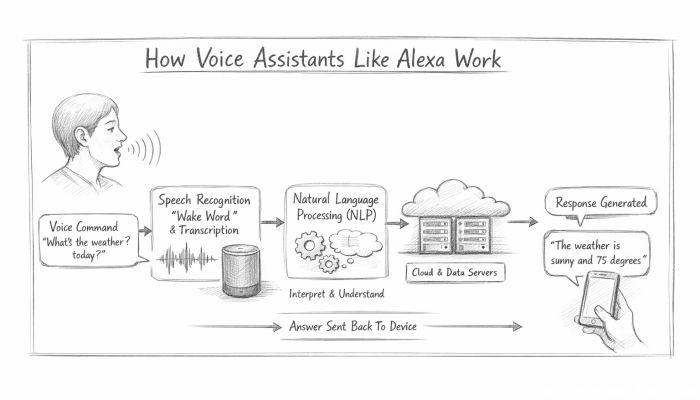 How Voice Assistants Like Alexa Work
 Federated Learning: AI Without Sharing Data