How Password Managers Work
In today's hyper-connected world, where nearly every aspect of life relies on digital accounts and online services, managing passwords has become a complex yet essential task. With cyber threats escalating and individuals struggling to recall dozens—or even hundreds—of unique passwords, the need for a reliable, efficient, and secure solution has never been greater. Enter password managers: sophisticated tools designed to simplify and safeguard the way we store, generate, and use passwords. But how exactly do these digital guardians work? This article ventures into the inner workings of password managers, unraveling the technology, security mechanisms, and user conveniences that empower millions to stay protected in an increasingly perilous cyber landscape.
- The Password Problem: Why We Need Password Managers
- What Is a Password Manager?
- Encryption: The Heart of Password Manager Security
- The Master Password: Gateway to Your Vault
- Password Generation: Creating Strong and Unique Keys
- Autofill and Auto-capture: Convenience Meets Security
- Cross-Platform Synchronization: Access Anywhere, Anytime
- Two-Factor Authentication (2FA) Integration
- Security Audits and Alerts: Proactive Defense Mechanisms
- Backup and Recovery: Ensuring Credential Safety
- Cloud-Based vs. Local Password Managers
- Potential Risks and Best Practices
- Conclusion: Empowering Digital Security Through Password Managers
- More Related Topics
The Password Problem: Why We Need Password Managers
Passwords are the first line of defense for our digital identities, but their effectiveness depends heavily on how they are created, stored, and managed. Weak, reused, or easily guessable passwords open doors for cyberattacks such as phishing, brute force attacks, and credential stuffing. Remembering dozens of complex passwords is impractical, leading many users to make risky compromises. Password managers address this dilemma by offering a secure vault where unique, strong passwords can be stored and retrieved effortlessly, eliminating the need for memorization and reducing vulnerability to cyber threats.
What Is a Password Manager?
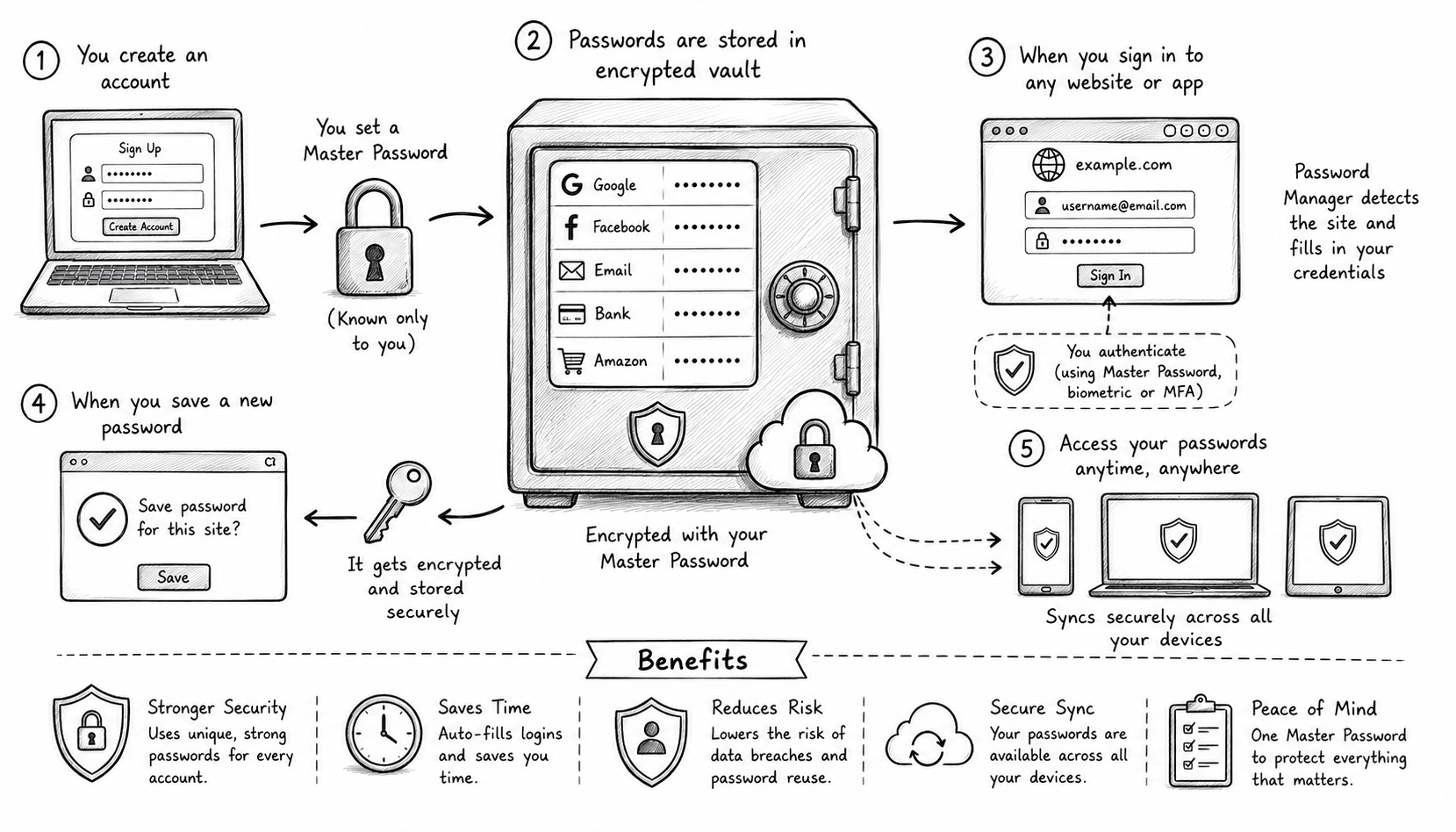
At its core, a password manager is software designed to securely store and manage login credentials for websites, applications, and services. These tools generate strong passwords, remember them, and automatically fill login forms when needed. While some password managers are standalone apps, others are integrated as browser extensions or mobile apps, providing seamless access across devices. By encrypting stored passwords and safeguarding them behind a master password or biometric authentication, password managers act as digital safes for sensitive credential information.
Encryption: The Heart of Password Manager Security
Encryption plays a pivotal role in protecting user data within password managers. When a password is saved, it is not stored as plain text but is encrypted using advanced cryptographic algorithms such as AES-256 (Advanced Encryption Standard with 256-bit keys). This means even if attackers gain access to the database, the data remains unintelligible without the proper decryption key. Modern password managers typically employ end-to-end encryption, ensuring that only the user’s device has access to the decrypted data, thus preserving privacy and security against server-side breaches.
The Master Password: Gateway to Your Vault
The master password is the one critical piece of information users must remember, as it unlocks access to the password vault. This password is never stored or transmitted to password manager servers; instead, it is used locally on the user's device to derive cryptographic keys through algorithms such as PBKDF2 or Argon2. Because the master password must be extremely strong and unique, many password managers include tools and tips for creating secure master keys. Losing or forgetting this key generally means losing access to all stored credentials, underscoring its importance.
Password Generation: Creating Strong and Unique Keys
One of the standout features of password managers is their ability to generate complex, random passwords that far exceed the randomness and length that most people create manually. These passwords can include a mix of uppercase and lowercase letters, numbers, and special characters, adhering to best practices recommended by cybersecurity experts. Users can often customize password length and complexity depending on the requirements of each service. This automation encourages better security hygiene by preventing password reuse and resisting brute-force attacks.
Autofill and Auto-capture: Convenience Meets Security
To enhance user experience, most password managers include features such as autofill, which automatically fills username and password fields on websites or apps. This reduces the friction of logging in and limits the chance of keylogging or shoulder-surfing attacks. Additionally, auto-capture detects when users enter new login credentials and offers to save them securely. These seamless integrations streamline digital workflows while maintaining the integrity of security protocols.
Cross-Platform Synchronization: Access Anywhere, Anytime
The proliferation of multiple devices—smartphones, tablets, laptops—necessitated password managers to evolve with synchronization features. By securely syncing encrypted data across devices via cloud services, users can access their vaults regardless of the platform. This synchronization uses end-to-end encryption so that passwords are only decrypted locally. Popular password managers implement zero-knowledge architecture, ensuring the service provider cannot access raw data even during syncing, thus maintaining user confidentiality.
Two-Factor Authentication (2FA) Integration
Adding an extra layer of protection, many password managers support two-factor authentication (2FA) to access the password vault itself. Whether through biometrics, hardware tokens, or app-based one-time passwords, 2FA significantly reduces the risk of unauthorized access even if the master password is compromised. Some password managers also double as 2FA token generators, consolidating security tools and simplifying user workflows.
Security Audits and Alerts: Proactive Defense Mechanisms
To keep users informed and protected, modern password managers include security audit features that scan stored passwords for weaknesses, such as duplicates, common passwords, or passwords exposed in breaches. They provide actionable insights, encouraging users to update risky credentials promptly. Real-time alerts notify users of suspicious activity or known vulnerabilities related to their accounts, empowering users to respond swiftly to potential threats.
Backup and Recovery: Ensuring Credential Safety
Even the most secure systems can encounter mishaps, so password managers typically offer backup and recovery options to protect user data. Backups may be encrypted copies stored locally, in the cloud, or on external devices. Recovery methods vary but often rely on recovery codes, biometric verification, or trusted contacts. Thoughtful implementation of these methods balances user convenience with security to prevent unauthorized vault restoration.
Cloud-Based vs. Local Password Managers
Password managers generally fall into two categories based on data storage: cloud-based and local (offline) managers. Cloud-based services offer convenience with cross-device synchronization but rely on internet connectivity and trust in the provider's infrastructure and security. Local managers store encrypted data exclusively on the user’s device, offering increased privacy at the cost of limited access and manual syncing. Understanding these differences helps users select tools suited to their threat models and usage patterns.
Potential Risks and Best Practices
While password managers enhance security, they are not foolproof. Risks include master password compromise, device vulnerabilities, phishing attacks targeting autofill, and software bugs. Therefore, users must practice good habits such as setting strong master passwords, enabling 2FA, regularly updating the password manager software, and remaining vigilant against social engineering. Combining a password manager with general cybersecurity awareness forms a robust defense strategy.
Conclusion: Empowering Digital Security Through Password Managers
Password managers have transformed from niche utilities into indispensable tools for digital security in an age marked by escalating cyber threats and password fatigue. By employing sophisticated encryption, seamless usability features, and proactive security measures, password managers enable individuals and organizations alike to maintain robust authentication practices without sacrificing convenience. Understanding how these technologies work demystifies their role in personal cybersecurity, encourages informed adoption, and highlights the importance of integrating such tools within broader digital defense strategies. Ultimately, password managers represent a crucial step toward securing our digital identities and fostering safer online spaces for all.
 How to Make the Most of Your Holiday Break
 The Best Winter Destinations for a Cozy Getaway
 How to Organize Your Holiday Travel Plans with Ease
 The Ultimate Guide to Cooking for a Crowd
 How to Make Healthy Comfort Food Without the Guilt
 5 Delicious Vegan Breakfast Ideas You Can Make in Minutes