How to Secure Wi-Fi Networks
In today’s digitally connected world, Wi-Fi networks serve as the backbone of our online interactions, enabling everything from casual browsing and streaming to critical business communications and smart home operations. However, the convenience of wireless connectivity comes with inherent security risks. Unsecured or poorly protected Wi-Fi networks can expose sensitive information, facilitate unauthorized access, and even allow cybercriminals to launch attacks. With cyber threats becoming more sophisticated, understanding how to secure Wi-Fi networks is essential for individuals, businesses, and organizations alike. This article delves into the best practices, technologies, and strategies needed to protect your wireless networks from intruders, safeguard your data, and maintain robust privacy. Whether you’re a home user or an IT professional, mastering these security techniques will help you build a reliable and protected wireless environment.
- Understanding Wi-Fi Security Risks
- Choosing the Right Wireless Encryption Protocol
- Setting a Strong and Unique Password
- Changing Default Router Settings
- Enabling Network Encryption on Routers
- Using a Guest Network for Visitors
- Disabling WPS (Wi-Fi Protected Setup)
- Keeping Router Firmware Updated
- Employing MAC Address Filtering
- Minimizing Wi-Fi Signal Range
- Using VPNs for Additional Protection
- Monitoring Network Activity Regularly
- Conclusion
- More Related Topics
Understanding Wi-Fi Security Risks
Before implementing security measures, it’s important to recognize the common risks associated with Wi-Fi networks. Unprotected wireless connections are vulnerable to eavesdropping, where attackers intercept data transmissions to steal passwords or personal information. Rogue access points and Evil Twin attacks mimic legitimate networks to lure unsuspecting users. Unauthorized users may access your network to consume bandwidth or launch attacks on other connected devices. Additionally, outdated hardware or weak security protocols can be exploited to gain access. By understanding these vulnerabilities, users can better appreciate the necessity and urgency of securing their Wi-Fi networks.
Choosing the Right Wireless Encryption Protocol
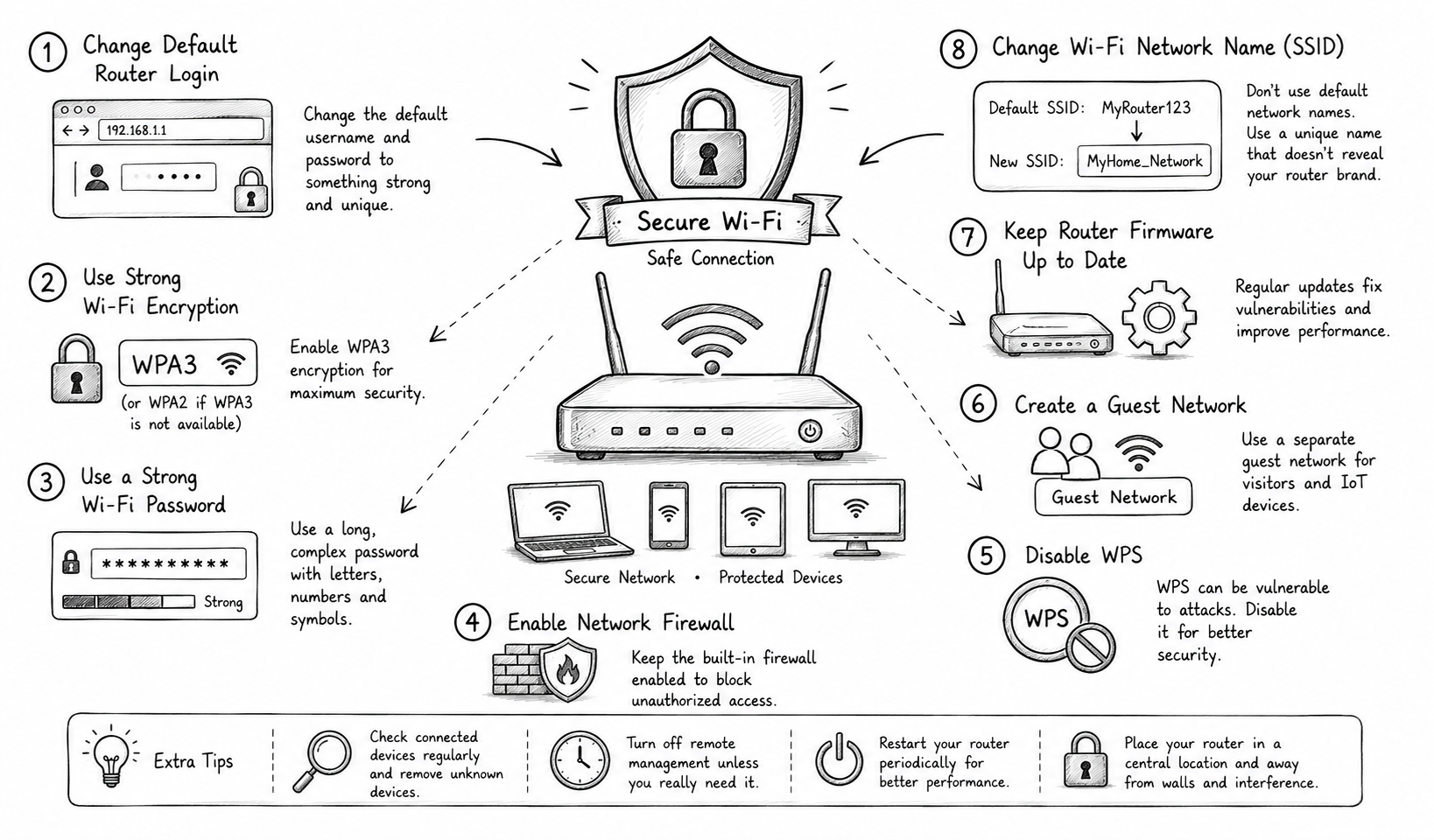
Encryption is the cornerstone of Wi-Fi security, encoding data so unauthorized users cannot read it. The most commonly used protocols are WEP, WPA, WPA2, and WPA3. WEP is outdated and highly insecure, leaving networks susceptible to easy hacks. WPA improved on WEP but still has vulnerabilities. WPA2 became the standard for years, using AES encryption for stronger protection. The latest WPA3 protocol offers enhanced encryption and protection against brute-force attacks, along with better support for open networks via Opportunistic Wireless Encryption (OWE). Selecting WPA3 wherever possible is strongly advised, but if your hardware doesn’t support it, WPA2 with AES remains a reliable option.
Setting a Strong and Unique Password
A secure password or passphrase is the first line of defense against unauthorized access to your Wi-Fi network. Avoid default or commonly used passwords, which are easily guessable or available online. Instead, create a complex password combining uppercase and lowercase letters, numbers, and special characters. Longer passphrases are generally more secure, balancing memorability with complexity. Avoid using easily known information such as birthdays or names. Regularly updating your Wi-Fi password is also crucial, especially if you suspect it has been compromised or when guests no longer need access.
Changing Default Router Settings
Routers often come with default usernames and passwords that are well-known to hackers and publicly documented. Leaving these unchanged poses an immediate security risk. Change the default administrative credentials to strong, unique usernames and passwords to prevent unauthorized access to the router’s configuration interface. Additionally, disable features like remote management unless absolutely necessary, as these can open doors to external attackers. Altering the default network name, known as the SSID (Service Set Identifier), can also enhance security by making your network less obvious to attackers looking for generic or default networks to exploit.
Enabling Network Encryption on Routers
Beyond setting a strong password, you must ensure that encryption is properly enabled on your Wi-Fi router. Most consumer routers offer settings to enable WPA2 or WPA3 encryption. In addition to encryption, some routers allow you to configure advanced security features like firewall protection and intrusion detection. Enabling these options adds another layer of defense by actively monitoring network traffic for suspicious activity. Always verify that your router’s firmware is up-to-date, as manufacturers regularly release patches that fix security vulnerabilities and improve encryption mechanisms.
Using a Guest Network for Visitors
Allowing visitors access to your Wi-Fi network is common, but giving them unrestricted entry can jeopardize your primary network’s security. Most modern routers support the creation of a guest network, a separate Wi-Fi access specifically for visitors. These networks isolate guest traffic from your main devices, preventing guests from accessing sensitive files or devices. Furthermore, guest networks can be configured with their own unique passwords and restrictions, such as bandwidth limits or time-based access. This strategy minimizes risk while maintaining hospitality.
Disabling WPS (Wi-Fi Protected Setup)
Wi-Fi Protected Setup (WPS) is a convenience feature intended to simplify network configuration, allowing users to connect devices using a PIN or push-button method. However, many security experts caution against using WPS because it can be exploited through brute-force attacks to gain network access easily. Disabling WPS on your router eliminates this vulnerability, forcing users to rely on inputting complex passwords instead. While it may seem less convenient, the benefits of disabling WPS far outweigh the ease of connection it provides.
Keeping Router Firmware Updated
Router manufacturers regularly release firmware updates that patch known security weaknesses and improve functionality. Neglecting these updates can leave your network vulnerable to exploitation based on previously discovered flaws. Many routers support automatic updates, which are recommended to ensure timely protection. For those without automatic updates, periodically checking the manufacturer’s website for new firmware and applying updates manually is essential. Remember to follow instructions carefully when updating firmware to prevent device malfunctions.
Employing MAC Address Filtering
MAC (Media Access Control) address filtering allows you to limit network access to specific devices by their unique hardware addresses. By configuring a whitelist of allowed MAC addresses on your router, only those devices will be able to connect to your Wi-Fi network. While this method adds an extra hurdle for unauthorized users, it shouldn’t be relied on as the sole security measure because MAC addresses can be spoofed by sophisticated attackers. Instead, use MAC filtering in combination with strong encryption and authentication for better security.
Minimizing Wi-Fi Signal Range
Reducing the physical range of your Wi-Fi signal can limit exposure to potential attackers outside your premises. Routers with high transmission power can broadcast signals well beyond your home or office, making it easier for outsiders to detect and attempt to connect to your network. Many routers allow you to adjust the signal strength in the settings menu. By lowering transmission power to the minimum level required for good coverage within your space, you reduce the chance of nearby threats. Additionally, placing your router centrally and away from windows or external walls can further minimize signal leakage.
Using VPNs for Additional Protection
Even with a secured Wi-Fi network, the data transmitted over the internet may still be vulnerable to interception. Using a Virtual Private Network (VPN) encrypts all outbound and inbound traffic, masking your IP address and protecting your data from prying eyes. VPNs are especially beneficial when using public Wi-Fi or guest networks with potentially weaker security. For Wi-Fi networks at home or business, VPNs add an extra layer of encryption beyond what Wi-Fi security protocols provide, safeguarding sensitive communications from local and external threats.
Monitoring Network Activity Regularly
Keeping an eye on who and what is connected to your network is an important ongoing security practice. Many routers have built-in tools or companion apps that show the devices currently linked to your Wi-Fi, providing details like device names and IP addresses. Regularly reviewing this list can help identify unauthorized devices or unusual activity. If you spot unfamiliar devices connected, change your Wi-Fi password immediately and consider running further diagnostic or security scans. Setting up alerts for new connections or suspicious access attempts can further enhance your ability to respond swiftly.
Conclusion
Securing your Wi-Fi network is no longer optional in an increasingly connected world; it is a vital aspect of safeguarding your privacy, data, and digital assets. By understanding the risks associated with wireless networks and implementing robust security measures—ranging from choosing the latest encryption protocols and strong passwords to managing router settings and monitoring network activity—you can significantly reduce the likelihood of becoming a victim of cyber intrusions. While no system is perfectly impenetrable, combining multiple layers of protection tailored to your environment will create a resilient wireless network. Staying informed, proactive, and vigilant will ensure your Wi-Fi remains a trustworthy portal to the digital realm, protecting both personal and professional communications now and into the future.
 How to Make the Most of Your Holiday Break
 The Best Winter Destinations for a Cozy Getaway
 How to Organize Your Holiday Travel Plans with Ease
 The Ultimate Guide to Cooking for a Crowd
 How to Make Healthy Comfort Food Without the Guilt
 5 Delicious Vegan Breakfast Ideas You Can Make in Minutes