How to start scripting with Bash
Learning how to use the Bash shell opens up many possibilities to automate tasks, modify files, and run programs without leaving your terminal. If you want to write programs that run quickly and can interact with your shell, or just need to know how to perform daily tasks faster, this is the guide for you. Below, we’ll cover what Bash is, basic syntax, and how to write your very first Bash script.
What Is Bash?
GNU Bash, or Bash for short, is a command language interpreter for Unix-based operating systems. The programs you write in bash are called scripts. Bash scripts are great for simple programs that you can run straight from your terminal. Bash differs from other languages you may know because it uses the same commands you would normally type into your terminal. Scripting can allow you to use these commands together in powerful ways.
Before you begin learning how to use Bash, you should install Bash on your computer. Most Linux and Mac machines will have Bash pre-installed. To check what shell you’re using, type echo $SHELL in your terminal. If Bash is not installed, you can install it through your package manager. For Windows, you can install Bash through the Windows Subsystem for Linux or download a program like Git Bash to simulate the Bash shell.
Creating Your First Bash Script
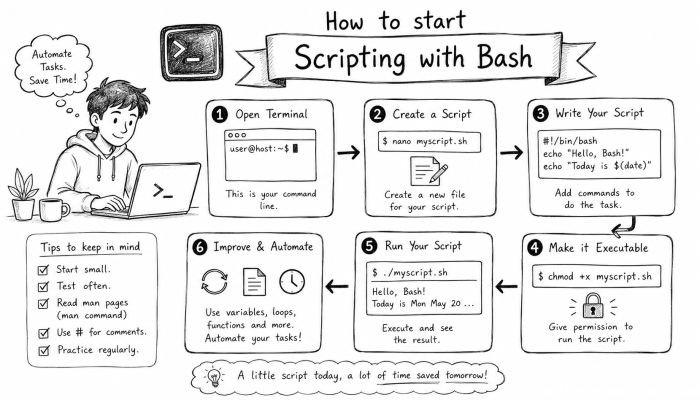
When you create your first bash script, you are going to want to print out “Hello World”. Every bash script should start with which interpreter to use. We’re using bash, so we’ll specify this at the top of our file. Create a new file called hello.sh, open it in your editor of choice, and add the following line to the top of the file.
#!/bin/bash
This is called a shebang. Next, we’ll use the echo command to print out “Hello World”.
#!/bin/bash
echo “Hello World!”
Save the file, and in your terminal, type chmod +x hello.sh to give execute permissions to your file. Now you can run your program by typing ./hello.sh. Your terminal should print out Hello World if everything is correct. Congratulations! You have just created your first bash script!
Basic Syntax
The basic syntax for Bash includes using commands you would typically enter into the terminal. A Bash script is just a series of commands that you would enter into the terminal one after another.
#!/bin/bash
command1
command2
command3
Note: You can include comments in your bash scripts using the # symbol.
Variables
You can create variables by simply typing variable_name=value. To access the variable, prepend $ to the variable name.
Example Script:
#!/bin/bash
greet=hello
echo $greet world!
Conditionals and loops
If/else statements are used in bash by using the if [[ condition ]] syntax. For loops loop through lists of items.
#!/bin/bash
if [[ 5 -gt 3 ]]; then
echo “condition was true”
else
echo “condition was false”
fi
Functions
Functions in bash are similar to functions in other languages. They allow you to reuse code instead of copying and pasting.
greet() {
echo “Hello World!”
}
greet
Reading User Input
You can read user input using the read command.
#!/bin/bash
echo “What is your name?”
read name
echo “Hello $name!”
Handling Errors
To handle errors in bash, you can use set -e. This will cause the script to exit if any statements return a non-zero exit code. You can debug using set -x which will print each command before it’s executed.
Automatic Script Execution
To execute scripts automatically, you can use cron jobs.
Scripting Best Practices
Use descriptive names. This will help you when you come back to your script months from now.
Learning Bash will help you write quick programs that can manipulate the filesystem and run programs. You can learn more about Bash by reading the Bash manual.
 How to Make the Most of Your Holiday Break
 The Best Winter Destinations for a Cozy Getaway
 How to Organize Your Holiday Travel Plans with Ease
 The Ultimate Guide to Cooking for a Crowd
 How to Make Healthy Comfort Food Without the Guilt
 5 Delicious Vegan Breakfast Ideas You Can Make in Minutes