How to start automation with Python
Automation saves you time, money, and energy when performing repetitive tasks on your computer, websites, and phone. If you want to learn how you can automate boring tasks as easily as possible, Python should be your go-to language. In this article, we will teach you how to start automation using Python. By the end of this article, you will know how to get started with Python Automation and build exciting projects.
- How Does Automation Work?
- Why Automate With Python?
- The Best Python IDEs to Use
- Knowing the Basics of Python
- Automating File and Folder Creation
- Automating Websites With Selenium
- BeautifulSoup: Web Scraping Automation
- How to Automate Tasks with Python APIs
- Automating Emails
- How to Structure Your Code
- Ideas for Python Automation Projects
- Python Automation Communities
- Conclusion
- More Related Topics
How Does Automation Work?
Automation is a broad term that involves automating repetitive tasks using tools and technologies. Tasks such as data entry, file management, web scraping, notification automation, email automation, API integration, and data scraping can all be automated. Automation allows computers or software programs to perform tasks without human involvement.
Why Automate With Python?
Python is probably the best programming language to start with when learning about automation. Python code is easy to understand and requires less coding compared to other languages. Python integrates with other languages and services and is powerful enough to automate tasks in web browsers, read and write files, handle data among other features.
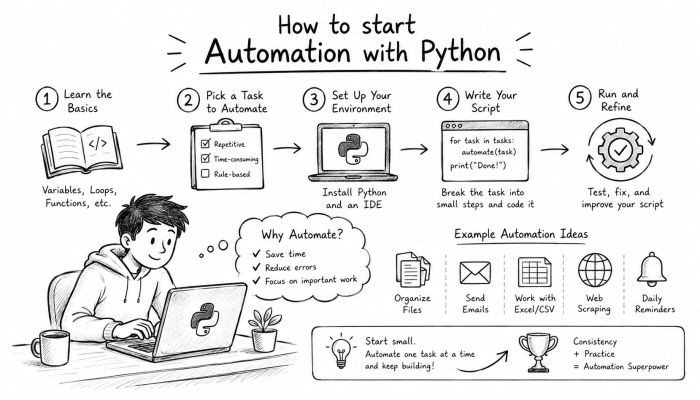
The Best Python IDEs to Use
Before we start automating things with Python, you will need to set up Python in your computer. Install the latest version of Python from their official website then install a Python IDE for writing and running Python code.
Integrated development environments come in different types. You can either use all-purpose IDEs such as PyCharm and Visual Studio code or text editors such as Sublime text or Notepad++.
Knowing the Basics of Python
Before you start automating tasks with Python, you should know how to program using Python. There are several free resources online that can help you learn Python. Knowing the Python basics will allow you to write programs that automate tasks.
You should know about Python Variables, Data Types, If else statements, Loops, Functions, Modules, and Exception handling.
Automating File and Folder Creation
File organization and manipulation is one of the most common use cases of automation. Have you ever found yourself organizing your download folder or moving lots of files to their respective folders? You can automate these tasks. Tasks such as renaming downloads, moving files to specific folders based on conditions, backing up files to cloud storage, and organizing folders can be automated.
Learn the commands to create, move, read and delete files and folders using Python.
Automating Websites With Selenium
Have you ever wanted to automate tasks on websites such as clicking buttons and filling forms? With Python, you can automate tasks on websites.
Selenium is Python library used to automate websites. Start by learning how to use the Selenium library to open websites, read text on websites, fill website forms, and clicking buttons on websites.
You can learn how to automate signing into your Gmail account, automatically scrape products prices form e-commerce websites, and many more.
BeautifulSoup: Web Scraping Automation
Did you know that with Python, you could automate reading data from websites? Web scraping automates reading data from websites.
BeautifulSoup is a Python library used for web scraping. Learn how to use BeautifulSoup and requests to download websites and read data from websites. You should learn how to extract data such as website headings, reading table data from websites, reading HTML attributes and images.
How to Automate Tasks with Python APIs
API stands for application programming interface. With APIs, you can automate tasks with other applications and online services. Using the requests library in Python, you can automate sending data and reading data from APIs.
Learn how to automate posting to social media, reading weather data from weather APIs, automatically sending emails, and many more.
Automating Emails
Sending emails manually is such a drag, especially when sending bulk emails. You will be surprised at how many tasks you can automate with emails.
Learn how to use SMTP library in Python to send emails.
You should also learn how you can automate reading emails using the imaplib library.
You should also learn how to send desktop notifications with automation. This way, whenever you automate a task that produces an important result, you can get notified.
Task Automation Using the `schedule` Library
So far, we have covered how to automate tasks, but what if you want to schedule your tasks to automate periodically?
Learn how to use Python schedule Library to schedule your tasks.
Alternatively, you can learn how to integrate your python scripts with Cron jobs (Linux/MacOS) or Task Scheduler(Windows).
How to Structure Your Code
If you plan on building big projects, you should learn how to structure your codebase. Learning how to place your code in functions helps you make your code more readable.
Learn exception handling in Python and how to automate logging in your Python scripts.
You should also learn how to comment your code and use Git to manage your codebase.
Ideas for Python Automation Projects
Learning how to automate simple tasks is fun, but once you get the hang of it, you should try to solve real-world problems using your new skills.
You can try automating invoicing process, scraping job listings, building email responding bots, or automating social media tasks.
Python Automation Communities
If you have questions about learning python automation, you can try asking the internet.
Ask fellow learners on reddit (r/learnpython), or join the Python discord server to get assistance.
Feel free to ask questions on Stack Overflow if you get stuck. There are so many amazing python automation resources online.
Conclusion
Automating tasks with Python allows you to save time you can use to do more fun things. Start by learning Python and understanding how computers work. From there, you can learn about automating files, websites, and reading data from websites.
Once you get the hang of it, learn how to send emails and read emails with Python. You should also learn how to automate tasks with APIs.
Once you learn the basics of Python automation, you can try your hands on some projects. Build projects that interest you and you are sure to enjoy your journey learning Python Automation.
 How to Make the Most of Your Holiday Break
 The Best Winter Destinations for a Cozy Getaway
 How to Organize Your Holiday Travel Plans with Ease
 The Ultimate Guide to Cooking for a Crowd
 How to Make Healthy Comfort Food Without the Guilt
 5 Delicious Vegan Breakfast Ideas You Can Make in Minutes