Role of SQL in Data Science
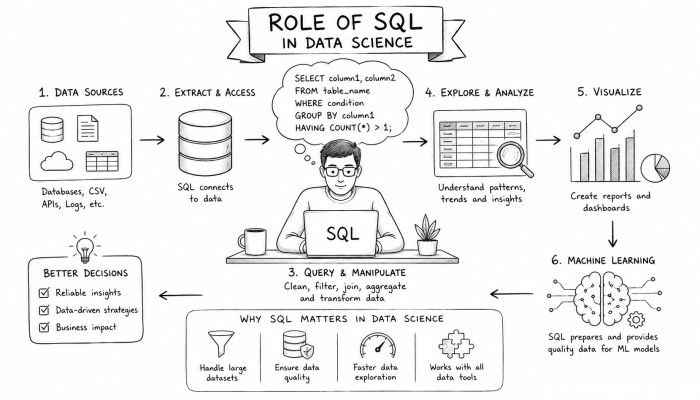
Welcome to the wonderful world of data science! The goal of data science is to learn insights about data. Upon hearing “learn insights about data,” your first thought might have been complex machine learning algorithms. Interestingly enough, just knowing how to effectively manipulate your data with SQL is considered a data science skill. SQL stands for Structured Query Language. SQL is a programming language that you use to speak to a database. With SQL, you can access your data, update your data, and manipulate your data to get it into the shape you need for analysis. In this article, we’ll be discussing SQL for data science and some real world applications of SQL.
What is SQL?
SQL stands for Structured Query Language. SQL is a programming language that is used to communicate with a database. With SQL, you can SELECT data from a database, filter and manipulate that data, UPDATE the data in a database, and CREATE new tables in a database, among other things. Since a majority of the world’s data is stored in SQL databases ( customer data , financial transaction data, server logs, etc. ), knowing how to use SQL is crucial to being able to access these insights.
Why should Data Scientists Know SQL?
SQL is simple to learn but that doesn’t mean SQL isn’t powerful. Also, a large majority of the world’s data is stored in relational databases ( MySQL , PostgreSQL, Microsoft’s SQL Server, to name a few). Knowing how to use SQL allows a data scientist to easily access this data. SQL is declarative which means that you are telling SQL what you want it to do, not how to do it. You can write SQL queries to JOIN tables together, filter out unwanted data, and group your data to gain a better understanding of what’s going on with your data.
Retrieve Your Data
The first thing you’ll want to do is get your hands on your data! With SQL, you can SELECT your data from the database. With a SELECT statement, you specify which columns of data that you want to SELECT. Using a WHERE statement you can filter your data right in the SQL query. Filtering your data will make your life easier when it comes to data science, not to mention running these queries yourself will help you better understand how your data is structured.
Cleaning Data
Raw data is dirty. It’s almost never in the shape that you want when retrieving it from a database. The cool thing about SQL is that you can clean your data with SQL before exporting it from the database. Trim spaces from your data with TRIM . Need to change the type of data in a column? Use CAST or CONVERT . Need to replace values in your data? Use REPLACE. There are SQL commands for just about anything you can think to do to your data.
Aggregate your Data
SQL has built in aggregation functions such as SUM(), AVG(), COUNT(), MIN(), and MAX(). Aggregation functions allow you to learn about your data. For instance, maybe you would like to know how many sales you made in total for each region. With SQL, you can SELECT your sales data and group it by the region column to return the total sales for each region. Grouping allows you to group your data by the unique values present in a column. Grouping your data allows you to do cohort analysis, among other things.
Write More Advanced Queries
As you start to write more advanced WHERE clauses, you can nest your queries inside of other queries. These are called subqueries . You can use the results from one query as a filter in another query. SQL even has window functions that allow you to run calculations across a set of rows that are related to the row being currently selected.
Use SQL with Python / R
Don’t limit yourself to running queries in the database. If you’re using Python, you can use SQL directly in pandas! Pandas has a function called read_sql that allows you to run the SQL query and have the resulting data returned to a DataFrame. There are libraries that allow you to write SQL code right in your Jupyter Notebook alongside your Python code.
SQL and BIG DATA
What about when your data grows too large to fit on a single machine? There are big data solutions like Hadoop and Amazon Redshift. Amazon’s Redshift database doesn’t use SQL. However, it’s query language is called SQL-ish, and SQL-ish knows most of the same queries as SQL. If you know SQL, learning SQL-ish will be easy!
Feature Engineering
Feature Engineering is the process of creating new features that will allow your machine learning models to produce better results. SQL makes feature engineering easy! With SQL, you can aggregate historical data to create features about your customers. With SQL, you can join together tables to consolidate related data into a single table. With SQL, you can even run calculations to create new features.
Checking Data Quality
Creating constraints is one way to help ensure that your data in your SQL database is clean and consistent. Another way that SQL can help you with data quality is by checking to see if you have any missing values in your data. With a simple SQL query, you can return any rows in your database that are missing information.
Reporting
All of these BI Tools ( Looker , Tableau, PowerBI) connect to your database with SQL queries. You can use SQL to help with your dashboarding and reporting needs. With SQL, you can create queries that return aggregated data to display trends in your data.
The Future of SQL
SQL is here to stay. Organizations are still migrating terabytes of data into SQL databases. SQL is constantly evolving as well. There are extensions to SQL that allow you to store JSON and XML data in your database and query that data with SQL. New analytics functions are being added to SQL all the time allowing you to do more analytics in-database.
Conclusion
SQL is an essential tool for any data scientist to know. SQL allows you to retrieve your data from a database. With SQL, you can clean your data, transform your data and aggregate your data to get it ready for analysis. SQL can be used for data quality checks, creating reports, and even feature engineering. What can’t SQL do? !
 How to Make the Most of Your Holiday Break
 The Best Winter Destinations for a Cozy Getaway
 How to Organize Your Holiday Travel Plans with Ease
 The Ultimate Guide to Cooking for a Crowd
 How to Make Healthy Comfort Food Without the Guilt
 5 Delicious Vegan Breakfast Ideas You Can Make in Minutes