Data Cleaning Techniques
In the age of data-driven decision making, data is king. But even the most insightful analyses are only as good as the underlying data. Dirty data, which contains errors or inaccuracies that corrupt its quality, can lead to incorrect conclusions, lost customers, or wasted resources. This is where data cleaning comes in: The process of fixing or removing errors and inconsistencies in datasets improves their quality and makes them more trustworthy. While every dataset is different, there are many best practices and data cleaning techniques that can be applied universally to improve your data. In this article, we’ll cover twelve key methods that are sure to help you better understand and improve the data you work with on a day-to-day basis.
- Know Why Cleaning Is Important
- Identify Common Types of Data Errors
- Fill In Missing Data
- Remove Duplicate Data
- Standardize Data Formats
- Correct Data Inaccuracies
- Watch for Outliers
- Create Data Validation Rules
- Use Software to Clean Data
- Data Profile your Dataset
- Cleaning Text Data
- Monitor Data Quality Over Time
- Conclusion
- More Related Topics
Know Why Cleaning Is Important
Why spend time cleaning data? Any analysis you perform is only going to be as accurate as the data you put in. Intentionally or not, your data will likely contain errors. Data can be duplicated, missing values, formatted improperly, include typos and inaccuracies, or contain many other kinds of errors. Data cleaning methods address each of these problems to standardize your dataset and identify outliers. Cleaned data takes up less space to store and is faster to work with. Removing anomalies and correcting errors also improves machine learning algorithms’ ability to train on that data. Anyone who works with data should know how to clean it.
Identify Common Types of Data Errors
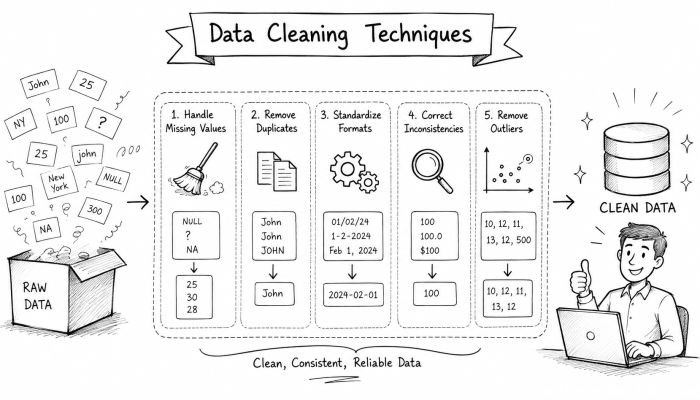
Before you start cleaning data, it helps to know what you’re cleaning. Many types of common data problems can occur when collecting data. Data points may be missing from your dataset, duplicated, inconsistent, inaccurate, or something else entirely. You may even have fields in your data that aren’t needed. Collecting all this information will help you determine how to best clean your data.
Fill In Missing Data
Missing data is called that for a reason: it’s completely absent from your dataset. Why would data be missing? It could be human error or a malfunctioning sensor. Sometimes data is missing because it wasn’t recorded or captured intentionally. Whatever the reason, your missing data needs to be filled or deleted. You can fill missing data with recorded averages, estimates from other sources, or by deleting the data points entirely. Filling in missing data is called imputation. When imputing, you don’t want to introduce extra noise to your data. If you’re not sure what to do, you can also just remove data points that are missing.
Remove Duplicate Data
Duplicate data happens. It’s a common issue that you’ll encounter, particularly in large datasets. Often, duplicate data occurs when the same machine learning algorithm is run multiple times or if there was an error in data collection. Duplicate data can heavily bias your analyses. The simplest form of duplicate data can usually be removed easily. Most statistical software has functions to identify and remove duplicates. But what if your data is not exactly the same? No two human entries are ever identical. This is known as fuzzy duplicates, and it’s a little more difficult to find. You’ll need to employ fuzzy matching algorithms to compare your data for similarity. Some techniques for identifying fuzzy duplicates include:
- Levenshtein distance
- Cosine similarity
- Clustering algorithms
Once you’ve identified duplicates in your dataset, you can safely remove them.
Standardize Data Formats
Another common problem is inconsistent formats. Data formats commonly include dates and times, phone numbers, zip codes, currency, or even capitalization in text fields. Data entered into a dataset may not match how you prefer the data to be displayed. Before you perform any kind of analysis, it’s important to standardize your data.
Correct Data Inaccuracies
Typos and inaccuracies are exceptionally common. At some point, someone had to enter this data by hand. Data can be inaccurate for a number of reasons. You can use data cleaning algorithms to identify values that don’t fall within a specified range. Many algorithms can be employed to fix typographical errors. You can even reference other datasets to verify data is accurate.
Watch for Outliers
An outlier is data that doesn’t follow an expected pattern. It can occur when there is a human typing error or malfunctioning sensor. Not all data that falls outside of your specified range is an outlier. By labeling data as an outlier, you aren’t magically making it disappear. You must manually discard outliers or fix them. Sometimes, outliers may be the point you’re looking for. For example, if you were looking for fraud in a dataset, you’d probably want to keep outliers.
Create Data Validation Rules
Validating data usually happens when it’s first captured or entered. Validations are rules set on your data to prevent human error. You can create rules specifying that a field must be filled out or that one date must be before another. Implementing checks when data is collected will save you tons of time cleaning data in the future.
Use Software to Clean Data
Luckily for us data nerds, there are numerous tools to help clean our data. Automated tools simplify repetitive tasks and save us time. For beginner data analysts, OpenRefine is a great place to start cleaning. If you’re looking for an open-source option and are comfortable with Python, check out Pandas. Both of these programs have extensive documentation on removing duplicates and correcting formats. There are a ton of commercial software options as well. Many of these come with data profiling and visualization capabilities. You can visually scan for issues in your data.
Data Profile your Dataset
Data profiling allows you to determine the quality of your dataset. By gathering statistics and information about your data, you can decide how to handle cleaning. Profiling allows you to check distributions, identify outliers, and find inconsistencies. Think of data profiling as looking at the big picture of your data. Many tools offer automatic data profiling functionality. It’s smart to data profile before and after cleaning your data.
Cleaning Text Data
Messy data isn’t limited to numbers. Text fields are equally susceptible to errors. Data cleaning techniques can be used to correct errors with text in data. Just like with big data, you’ll first want to take inventory of the text data you’re working with. Common problems include misspellings, capitalization errors, unnecessary punctuation, or extra symbols. Techniques like tokenization and stop-word filtering are common when preparing text for analysis. Regular expressions can help you remove unwanted characters and correct typical typos.
Monitor Data Quality Over Time
It doesn’t end here. Hopefully, you’ve implemented some of these techniques and cleaned your dataset. But what happens when your dataset updates? You have to constantly monitor your data for quality. There are tools that allow you to create dashboards and set up alerts when your data doesn’t meet certain criteria. Cleaning data is a continual process.
Conclusion
With those twelve techniques in mind, you should have no problem tackling even the dirtiest datasets. Remember that data will always be messy. Part of the data cleaning process is determining how much effort you want to do cleaning. Do you want your data to be perfect or just barely usable? There’s a tradeoff between time and data quality. Don’t be afraid to experiment with your data. Your datasets don’t have to be flawless, but they should be dependable. Make sure whatever decisions you make can be trusted.
 How to Make the Most of Your Holiday Break
 The Best Winter Destinations for a Cozy Getaway
 How to Organize Your Holiday Travel Plans with Ease
 The Ultimate Guide to Cooking for a Crowd
 How to Make Healthy Comfort Food Without the Guilt
 5 Delicious Vegan Breakfast Ideas You Can Make in Minutes