How to start SQL
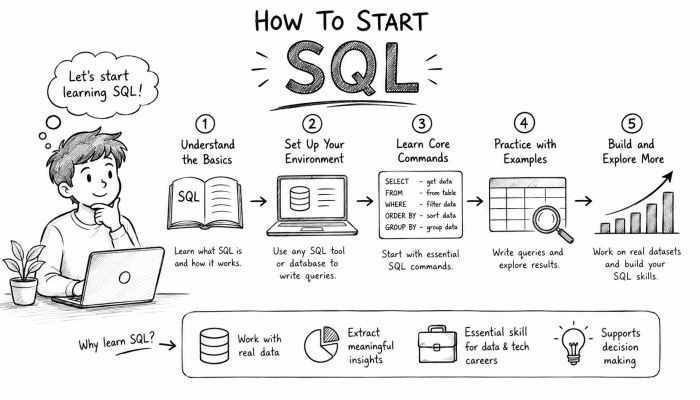
Structured Query Language (SQL) remains one of the most essential tools in the world of data management and analysis. Whether you’re looking to build a career in database administration, data analytics, or software development, understanding SQL is an invaluable skill. SQL enables you to communicate effectively with relational databases, helping you to store, retrieve, manipulate, and analyze vast amounts of data efficiently. Given the explosion of information and the increasing reliance on data-driven decisions across industries, knowing how to start SQL is more relevant than ever. This article offers a detailed yet accessible roadmap for beginners eager to dive into SQL—from understanding the basics and setting up environments to mastering advanced queries and best practices, ensuring you gain both confidence and competence in your SQL journey.
- Understanding What SQL Is
- Key Components of SQL You Should Know
- Setting Up Your SQL Environment
- Learning Basic SQL Statements: SELECT, INSERT, UPDATE, DELETE
- Exploring WHERE Clauses and Filtering Data
- Understanding JOINs: Bringing Multiple Tables Together
- Using Aggregate Functions and GROUP BY
- Practicing Subqueries and Nested Queries
- Understanding Indexes and Performance Optimization
- Navigating SQL Data Types and Table Design
- Resources and Tools for Learning SQL
- Building Projects to Reinforce Your Skills
- Staying Updated and Evolving Your SQL Expertise
- Conclusion
- More Related Topics
Understanding What SQL Is
SQL (Structured Query Language) is a standardized programming language designed for managing and manipulating relational databases. Unlike traditional programming languages that focus on processes and computation, SQL focuses on data and how it can be queried or modified. It serves as the primary language used to interact with databases by executing commands that create, read, update, and delete data, commonly summarized by the acronym CRUD. The beauty of SQL lies in its simplicity and versatility, allowing users to perform complex data operations with concise commands. SQL is widely used with popular database management systems like MySQL, PostgreSQL, SQLite, Microsoft SQL Server, and Oracle DB.
Key Components of SQL You Should Know
Before jumping into writing SQL statements, it’s important to familiarize yourself with its core components. These include Data Definition Language (DDL) commands such as CREATE, ALTER, and DROP, which define or modify database structures; Data Manipulation Language (DML) commands like SELECT, INSERT, UPDATE, and DELETE, which handle data manipulation; Data Control Language (DCL) commands like GRANT and REVOKE for permissions management; and Transaction Control Language (TCL) commands such as COMMIT and ROLLBACK that manage transaction processing. Understanding these components lays a foundational framework for effectively communicating with a database.
Setting Up Your SQL Environment
To start practicing SQL, you need access to a relational database management system (RDBMS). For beginners, lightweight and easily installable databases such as SQLite or MySQL are great starting points. Alternatively, cloud-based platforms like Google BigQuery or AWS Athena provide hosted solutions without the need for local installation. Setting up your environment involves downloading and installing the chosen RDBMS, configuring any required settings, and connecting through either a graphical user interface (GUI) or command-line interface (CLI). Tools like MySQL Workbench, pgAdmin, or DBeaver offer intuitive graphical interfaces that simplify database interaction for newcomers.
Learning Basic SQL Statements: SELECT, INSERT, UPDATE, DELETE
The backbone of SQL lies in mastering its basic data manipulation statements. The SELECT statement retrieves data according to specified criteria, making it the go-to command for querying databases. INSERT adds new data records, UPDATE modifies existing data, and DELETE removes data entries. Beginning SQL learners should practice these commands extensively, experimenting with simple datasets to develop confidence. For example, starting with a table of student records, try inserting new rows, selecting subsets based on conditions, updating scores, and deleting tests records. This hands-on approach fosters familiarity with syntax and command structure.
Exploring WHERE Clauses and Filtering Data
Retrieving data precisely is crucial in SQL, and the WHERE clause empowers you to filter results based on specific conditions. Whether you want to locate customers from a particular city or transactions above a certain amount, WHERE allows you to define such criteria. This clause supports a variety of comparative operators (=, <>, >, <, >=, <=) and logical connectors like AND, OR, and NOT that enhance query flexibility. For beginners, understanding how to construct effective WHERE conditions unlocks the potential to handle real-world data queries efficiently and logically.
Understanding JOINs: Bringing Multiple Tables Together
Real-world databases seldom store data in one table; instead, they split information across multiple related tables for efficiency and integrity. JOIN operations enable you to combine rows from two or more tables based on related columns. The most common types are INNER JOIN, LEFT JOIN, RIGHT JOIN, and FULL JOIN, each serving different purposes depending on whether you want only matching records or all possible combinations. Mastering JOINs is a vital step beyond basic SELECT statements since it allows comprehensive data analysis by accessing interconnected data points.
Using Aggregate Functions and GROUP BY
Aggregate functions like COUNT(), SUM(), AVG(), MIN(), and MAX() are vital tools for summarizing and analyzing data. They work in conjunction with the GROUP BY clause to group rows sharing common values into summary rows. For example, you might use GROUP BY to categorize sales by region and then use SUM() to calculate total earnings per region. This ability to perform grouped calculations is indispensable for reporting and business intelligence, making it a priority for anyone serious about SQL expertise.
Practicing Subqueries and Nested Queries
Subqueries involve embedding one query inside another, allowing you to perform more complex data selections and comparisons. These nested queries can exist in various clauses such as SELECT, FROM, or WHERE. For instance, you might use a subquery to find customers who placed orders above the average order value. Subqueries are powerful for breaking down large, complicated problems into smaller, manageable queries. Developing the skill to write clear and efficient subqueries helps transition from fundamental querying to professional-grade SQL.
Understanding Indexes and Performance Optimization
As databases grow, query performance becomes critical. Indexes act like the index of a book, allowing the database engine to locate data quickly rather than scanning the entire table. Knowing how and when to create indexes significantly enhances query speed and overall database performance. However, improper indexing can also degrade performance and increase storage overhead. Beginners should understand indexing basics alongside query optimization techniques, such as avoiding unnecessary columns in SELECT or limiting returned rows with LIMIT, to build efficient SQL habits.
Navigating SQL Data Types and Table Design
Data types define the nature of data stored in a column, such as integers, text, dates, or decimals. Selecting appropriate data types is fundamental to reducing storage requirements and ensuring integrity. SQL also supports constraints like PRIMARY KEY, UNIQUE, NOT NULL, and FOREIGN KEY to maintain data accuracy and relationships. Understanding these concepts enables you to design robust database schemas, preparing for real-world scenarios where data consistency and reliability are paramount.
Resources and Tools for Learning SQL
With the landscape of free and paid learning resources expanding daily, choosing the right tools for your style and goals can accelerate your progress. Interactive platforms like Codecademy, Khan Academy, and LeetCode offer hands-on SQL exercises with instant feedback. Books such as “SQL for Beginners” or “Learning SQL” provide structured, in-depth study. Database documentation, forums such as Stack Overflow, and practice environments like SQL Fiddle facilitate continuous practice and troubleshooting. Cultivating a learning routine that incorporates a mix of reading, practicing, and project work yields the best outcomes.
Building Projects to Reinforce Your Skills
Experience is the greatest teacher for mastering SQL. Constructing projects such as inventory management systems, library catalogs, or personal budgeting databases lets you apply theoretical knowledge to practical problems. As you build these projects, you’ll confront real database design challenges, query optimization needs, and troubleshooting scenarios. Moreover, showcasing completed projects in portfolios demonstrates your skills to potential employers and clients. Consistent practice through projects bridges the gap between novice and proficient SQL user.
Staying Updated and Evolving Your SQL Expertise
SQL has evolved significantly and continues to do so, with extensions and integrations in various data platforms. Staying updated on the latest SQL standards, features, and best practices will keep your skills relevant. Engage with communities, read industry blogs, and experiment with advanced topics like stored procedures, triggers, and window functions. Expanding your knowledge to related fields like NoSQL, Big Data querying, or cloud databases can also provide competitive advantages and a broader perspective on data management.
Conclusion
Starting SQL may seem daunting at first, but with a structured approach, it quickly becomes accessible and rewarding. By understanding its fundamental concepts, practicing essential commands, and progressively tackling more complex operations such as JOINS, subqueries, and aggregation, you develop both the knowledge and confidence to manipulate data effectively. Coupled with a carefully set-up learning environment and real-world project experience, this foundation prepares you to leverage SQL in diverse applications, from business intelligence to software development. As data continues to fuel innovation, mastering SQL opens doors to countless opportunities. Embrace this journey with curiosity, persistence, and continual learning to harness the full power of relational databases and shape your future in the data-driven world.
 How to Make the Most of Your Holiday Break
 The Best Winter Destinations for a Cozy Getaway
 How to Organize Your Holiday Travel Plans with Ease
 The Ultimate Guide to Cooking for a Crowd
 How to Make Healthy Comfort Food Without the Guilt
 5 Delicious Vegan Breakfast Ideas You Can Make in Minutes