How to start CI/CD pipeline
In today’s fast-paced software development landscape, accelerating delivery without compromising quality is more critical than ever. Continuous Integration and Continuous Deployment (CI/CD) pipelines have emerged as essential tools that empower teams to automate building, testing, and deploying applications efficiently and reliably. Despite the obvious benefits, the idea of setting up a CI/CD pipeline can be daunting for beginners due to the extensive tooling, configuration, and best practices involved. This guide aims to demystify the process by providing a comprehensive walkthrough on how to start a CI/CD pipeline from scratch. Whether you are working on a personal project or integrating pipelines into enterprise workflows, this article will lay the foundation you need. From understanding core concepts to selecting the right tools and implementing automation, you will learn the practical steps to streamline your software delivery lifecycle.
- Understanding CI/CD: The Foundation of Modern DevOps
- Identifying Your Project Requirements and Goals
- Choosing the Right Version Control System (VCS)
- Selecting CI/CD Tools and Platforms
- Setting Up Your Build Environment
- Automating Unit and Integration Tests
- Implementing Code Quality and Security Checks
- Configuring Deployment Strategies
- Monitoring and Logging Pipeline Performance
- Securing Your CI/CD Pipeline
- Scaling and Evolving Your Pipeline
- Common Pitfalls and Troubleshooting Tips
- Best Practices for Maintaining a Healthy CI/CD Pipeline
- Conclusion
- More Related Topics
Understanding CI/CD: The Foundation of Modern DevOps
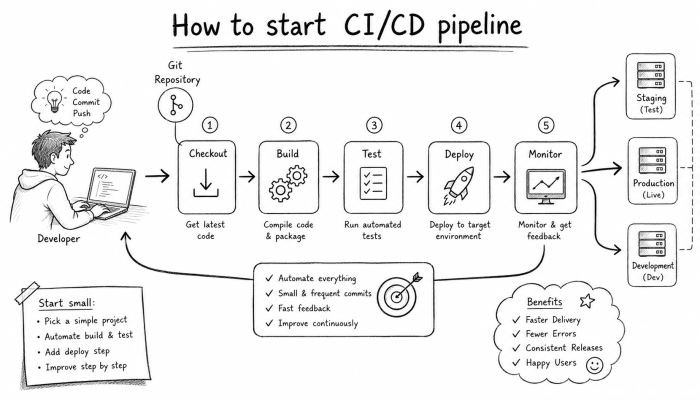
Before diving into the mechanics of starting a pipeline, it is essential to grasp what CI/CD really stands for and why it matters. Continuous Integration (CI) refers to the practice where developers frequently merge their code changes into a central repository, triggering automated builds and tests. This ensures that integration issues are detected early and reduces the "integration hell" scenario. On the other hand, Continuous Deployment or Continuous Delivery (CD) automates the release process, pushing code changes swiftly and reliably to production or staging environments. Together, CI/CD forms the backbone of modern DevOps, fostering faster feedback loops, higher code quality, and improved collaboration between development and operations.
Identifying Your Project Requirements and Goals
Every CI/CD pipeline should be tailored to the specific needs and goals of your project. Start by defining the core objectives: Are you automating unit tests, integration tests, or end-to-end tests? Do you need pipelines for multiple environments such as development, staging, and production? What programming languages and frameworks are involved? Identifying these requirements helps you choose compatible tools and design a pipeline workflow that aligns with your project’s complexity and team’s workflow. Documenting your goals also offers clarity on success metrics like deployment frequency, mean time to recovery, or reduction in bugs.
Choosing the Right Version Control System (VCS)
A robust version control system plays a pivotal role in a CI/CD pipeline since it acts as the single source of truth for your codebase. Popular options include Git, Subversion (SVN), and Mercurial, with Git being the dominant choice due to its distributed nature and extensive ecosystem. Platforms such as GitHub, GitLab, and Bitbucket provide integrated features that complement CI/CD workflows, including pull requests, branch protection, and webhooks. Ensure your team is comfortable with your chosen VCS and leverage it to enforce code quality by setting up branching strategies like Gitflow or trunk-based development.
Selecting CI/CD Tools and Platforms
The market is flooded with CI/CD tools—from cloud-based services like GitHub Actions, GitLab CI, CircleCI, and Travis CI to self-hosted solutions such as Jenkins, Drone, and Tekton. Selecting the right tool depends on factors like your project size, budget, preferred languages, and integration capabilities. Cloud-native tools typically offer easier setup and scalability but may involve vendor lock-in, while self-hosted tools provide greater customization and control at the cost of maintenance overhead. Evaluate these aspects carefully and consider starting with simpler tools if you are new to the CI/CD landscape.
Setting Up Your Build Environment
A CI/CD pipeline automates the process of building your application to ensure the code is compiled, packaged, or containerized correctly. Setting up a clean, reproducible build environment is crucial. Use containerization technologies like Docker to define your build environment, making it standardized across local machines and build servers. Define your build scripts meticulously to install dependencies, compile code, and generate artifacts. Ensure the environment mimics your production setup as closely as possible to catch environment-specific bugs early.
Automating Unit and Integration Tests
Testing forms the cornerstone of quality assurance in CI/CD pipelines. Unit tests validate individual components, while integration tests check how different parts work together. Automate the execution of your test suite to run after every code integration. By doing so, you catch regressions quickly and prevent faulty code from progressing further down the pipeline. Utilize testing frameworks tailored to your programming language—like JUnit for Java, PyTest for Python, or Jest for JavaScript—and configure your CI tool to generate test reports for transparency and quick debugging.
Implementing Code Quality and Security Checks
Beyond functional correctness, maintaining code quality and security is vital. Integrate static code analysis tools to inspect your codebase for potential bugs, code smells, and adherence to style guidelines. Security scanners can detect vulnerabilities early in the development process. Tools like SonarQube, ESLint, or OWASP Dependency-Check can be included as pipeline stages to enforce standards and prevent risky changes. Automated gates can block deployments if quality thresholds are not met, ensuring that only verified code proceeds.
Configuring Deployment Strategies
Once your build and tests succeed, the pipeline should handle deployments to various environments seamlessly. Different strategies exist, including blue-green deployments, rolling updates, and canary releases, which minimize downtime and reduce risk. Define your deployment jobs to transfer artifacts or container images to servers, cloud platforms, or container orchestrators such as Kubernetes. Automated scripts or infrastructure-as-code tools like Terraform or Ansible can streamline environment provisioning, making deployments repeatable and error-free.
Monitoring and Logging Pipeline Performance
Visibility into your CI/CD pipeline’s performance allows you to detect bottlenecks and improve efficiency. Set up monitoring dashboards that track build times, failure rates, deployment frequency, and other key performance indicators (KPIs). Logging every step and error message aids in faster troubleshooting. Many CI/CD platforms provide built-in analytics, while third-party tools like Prometheus or Grafana can be integrated for advanced monitoring. Establishing alerting mechanisms ensures your team is notified promptly of any pipeline disruptions or regressions.
Securing Your CI/CD Pipeline
Security considerations must extend beyond the application code to the entire pipeline. Set role-based access control to limit who can modify pipeline configurations or trigger deployments. Secure your secrets such as API keys, passwords, and certificates using vaults or secret management tools (e.g., HashiCorp Vault, AWS Secrets Manager). Regularly update pipeline dependencies to mitigate threats from vulnerabilities in build tools or container images. Conduct security audits and penetration tests within your CI/CD workflow to build trustworthiness in the automated process.
Scaling and Evolving Your Pipeline
As your project and team grow, your CI/CD pipeline should evolve accordingly. Start by modularizing pipelines, allowing parallel execution to reduce build times. Adopt microservices or mono repo strategies based on your architecture. Incorporate advanced techniques like pipeline as code to version-control your pipeline configuration itself for easier management and reproducibility. Stay informed about emerging tools and best practices that can optimize your pipeline’s efficiency, resilience, and developer experience over time.
Common Pitfalls and Troubleshooting Tips
Beginner teams often encounter challenges such as flaky tests, long build times, or broken deployments. Address flaky tests by isolating causes like race conditions or external dependencies and mock external services where possible. Cache dependencies to speed up builds and prune unnecessary steps to optimize pipeline duration. Use pipeline visualization features to understand flow and identify stages frequently failing. Regular retrospectives and feedback loops between developers, testers, and operations staff help continuously refine the pipeline and eliminate persistent bottlenecks.
Best Practices for Maintaining a Healthy CI/CD Pipeline
Maintaining a robust CI/CD pipeline requires discipline and ongoing effort. Commit to writing maintainable pipeline configurations and avoid hardcoding environment-specific values. Keep your dependencies up-to-date and document pipeline processes clearly for easy onboarding of new team members. Encourage frequent commits paired with automated tests to leverage the full advantages of continuous integration. Foster a culture of shared responsibility where developers, testers, and operators collectively monitor and improve the pipeline performance ensuring long-term success.
Conclusion
Starting a CI/CD pipeline is a transformative step that accelerates software development, enhances code quality, and amplifies team collaboration. By understanding core concepts, carefully selecting tools, and methodically automating building, testing, and deployment processes, teams can reduce manual errors and deliver features faster with confidence. While initial setup requires deliberate planning and learning, the long-term benefits of streamlined workflows and rapid feedback loops are unequivocal. Remember, a successful pipeline is not static—it evolves with your project and team’s needs. Embrace continuous improvement, monitor performance consistently, and prioritize security to extract the maximum value from your CI/CD journey. Whether you are just beginning or seeking to optimize existing setups, mastering CI/CD fundamentals will empower you to build resilient and efficient software delivery pipelines that stand the test of time.
 How to Make the Most of Your Holiday Break
 The Best Winter Destinations for a Cozy Getaway
 How to Organize Your Holiday Travel Plans with Ease
 The Ultimate Guide to Cooking for a Crowd
 How to Make Healthy Comfort Food Without the Guilt
 5 Delicious Vegan Breakfast Ideas You Can Make in Minutes