How to start UI/UX design
In the digital age, where user experience can make or break a product, UI/UX design has emerged as a crucial discipline shaping how people interact with technology. Whether it’s a mobile app, a website, or any digital interface, the design ensures that users find the experience simple, engaging, and efficient. If you have a flair for creativity, problem-solving, and empathy, starting a career in UI/UX design can be both rewarding and intellectually stimulating. However, breaking into this field can seem daunting without a clear roadmap. This article aims to demystify the journey by providing a structured, step-by-step approach to help beginners grasp the fundamentals, acquire necessary skills, and kickstart their UI/UX design career confidently.
From understanding the discipline’s core concepts to mastering essential tools and building a compelling portfolio, we’ll explore all the critical facets. Along the way, you’ll learn how to think like a designer and cultivate the mindset that drives successful designs. Whether you are a student, a professional considering a career switch, or simply curious about digital design, this guide offers valuable insights to turn your interest in UI/UX design into tangible skills and opportunities.
- Understanding What UI and UX Design Entail
- Developing the Right Mindset: Empathy and Problem-Solving
- Learning the Fundamental Principles of Design
- Getting Acquainted with Essential UI/UX Tools
- Building a Strong Foundation in User Research
- Mastering Wireframing and Prototyping Techniques
- Understanding the Importance of Usability Testing
- Creating a Portfolio to Showcase Your Skills
- Learning from Online Courses and Communities
- Gaining Real-World Experience Through Internships and Freelance Work
- Keeping Up with Trends and Evolving Technologies
- Planning Your Career Path and Setting Goals
- Conclusion
- More Related Topics
Understanding What UI and UX Design Entail
Before diving into the practicalities, it’s important to differentiate between UI (User Interface) and UX (User Experience) design, terms often used interchangeably but representing distinct aspects of the design process. User Interface design focuses on the visual elements—the buttons, typography, color schemes, and layouts users interact with. It involves crafting an aesthetic and interactive interface. User Experience design, by contrast, centers around how a user feels while navigating the product—the ease of use, accessibility, flow, and overall satisfaction. Good UX ensures the design meets user needs effectively. Together, UI/UX design creates harmonious, functional, and enjoyable digital products.
Developing the Right Mindset: Empathy and Problem-Solving
At its core, UI/UX design is about solving problems and improving user interactions. Cultivating empathy is paramount—you need to understand users’ pain points, motivations, and behaviors. This user-centric approach ensures your design choices serve actual needs rather than personal preferences or aesthetic whims. Additionally, a problem-solving mindset helps you iterate on designs, test assumptions, and refine solutions. Effective designers embrace feedback, adapt quickly, and tolerate ambiguity, making curiosity and continuous learning critical traits for success.
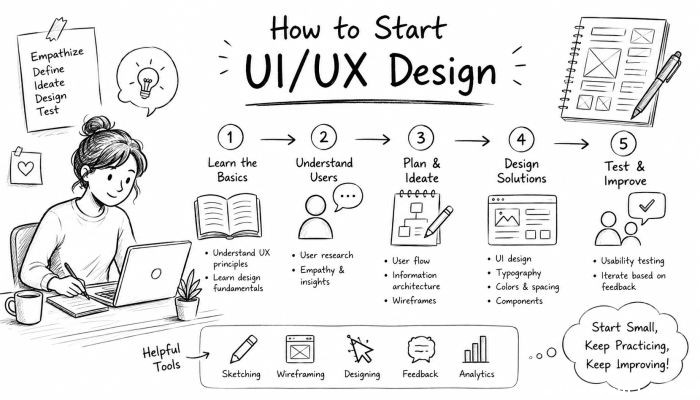
Learning the Fundamental Principles of Design
The foundation of UI/UX lies in mastering key design principles such as hierarchy, consistency, contrast, alignment, proximity, and balance. These principles guide how elements relate visually and functionally, ensuring clarity and harmony in your designs. For UX specifically, principles like usability, accessibility, and information architecture take precedence. Studying core concepts like the Gestalt principles can improve your ability to design interfaces that users intuitively understand. Solid knowledge of these principles equips you to create both attractive and meaningful user experiences.
Getting Acquainted with Essential UI/UX Tools
To translate your ideas into actual designs and prototypes, familiarizing yourself with industry-standard tools is essential. Popular UI/UX tools include Figma, Adobe XD, Sketch, and InVision. These platforms enable designers to craft wireframes, interactive prototypes, and design systems collaboratively. Many offer free or student versions, which are sufficient for beginners. Learning shortcuts, plugins, and best practices within these tools not only speeds up your workflow but also prepares you for real-world project demands.
Building a Strong Foundation in User Research
User research forms the backbone of effective UX design. Before designing interfaces, understanding your target audience is crucial. Research methods such as interviews, surveys, usability testing, and persona creation provide insights into user needs, behaviors, and pain points. Tools like Google Forms or UserTesting can assist in gathering and analyzing data. Beginner designers should focus on learning how to interpret research findings and synthesize them into actionable design goals, ensuring that every design decision is user-informed.
Mastering Wireframing and Prototyping Techniques
Wireframing is the process of creating low-fidelity sketches or digital outlines representing the product’s structure and flow without focusing on visual details. Prototyping builds upon wireframes to create interactive, clickable models that simulate user interactions. These steps allow designers to conceptualize ideas, test functionality, and identify usability issues early. For beginners, practicing with simple wireframes and progressively advancing to high-fidelity prototypes is a great way to develop practical skills and communicate designs clearly to stakeholders.
Understanding the Importance of Usability Testing
No design is perfect on the first try. Usability testing involves observing real users interacting with your prototype to identify problems and areas of confusion. Conducting tests early and frequently helps avoid costly design mistakes and ensures the product is aligned with user expectations. Beginners should learn how to plan testing sessions, collect qualitative and quantitative feedback, and analyze results objectively. Incorporating these insights into iterative design cycles enhances both the user experience and your credibility as a designer.
Creating a Portfolio to Showcase Your Skills
A well-curated portfolio is your ticket to landing jobs or freelance gigs in UI/UX design. It should showcase a diverse range of projects, highlighting your design thinking process, problem-solving abilities, and final deliverables. Even if you don’t have professional experience, consider creating case studies based on personal projects, redesigns of existing apps, or hypothetical briefs. Document your research, wireframes, iterations, and rationale to demonstrate a thorough approach. Online platforms like Behance, Dribbble, and personal websites provide excellent spaces to present your work attractively.
Learning from Online Courses and Communities
With the abundance of free and paid online resources, aspiring designers have unprecedented access to quality education. Platforms like Coursera, Udemy, Interaction Design Foundation, and LinkedIn Learning offer structured courses covering theory and practical skills. Joining UI/UX online communities such as Designer Hangout, Reddit’s r/userexperience, and Slack groups helps you stay updated, seek feedback, and network with peers and mentors. Active participation in discussions, challenges, and hackathons accelerates learning and exposes you to diverse perspectives.
Gaining Real-World Experience Through Internships and Freelance Work
Practical experience is invaluable; it bridges the gap between theoretical knowledge and industry expectations. Pursuing internships, apprenticeships, or freelance projects, even at the beginner level, exposes you to real client requirements, deadlines, and collaboration dynamics. Freelance platforms like Upwork and Fiverr provide entry points to build your resume. Working on tangible projects also strengthens your portfolio and helps develop soft skills such as communication and project management—crucial for career growth in UI/UX.
Keeping Up with Trends and Evolving Technologies
The design landscape is continually shifting with new trends, methodologies, and tools emerging frequently. Staying current ensures that your designs remain relevant and competitive. Follow influential blogs like Smashing Magazine, UX Collective, and Nielsen Norman Group—where you can learn about accessibility advances, mobile-first design, voice UI, and emerging frameworks like Design Systems. Adopting an experimental mindset enables you to integrate innovative techniques and adapt as the digital ecosystem evolves.
Planning Your Career Path and Setting Goals
Finally, it’s important to approach your UI/UX journey with clear goals and a plan for progression. Decide the areas you want to specialize in, such as interaction design, usability research, or visual design. Understand the key skills and roles within the industry—Junior Designer, UX Researcher, UI Designer, Product Designer—and tailor your learning accordingly. Set attainable milestones, pursue certifications if desired, and seek mentorship to accelerate your growth. The combination of motivation, consistent effort, and strategic planning will transform you from a novice to a competent UI/UX professional.
Conclusion
Starting in UI/UX design can be both exciting and challenging, requiring a blend of creativity, analytical thinking, and empathy. By understanding the distinction between UI and UX, mastering fundamental design principles, and developing proficiency with essential tools, you build a robust foundation. Emphasizing user research, wireframing, prototyping, and usability testing ensures your designs remain user-centered and effective. Supplementing your technical skills with real-world experience, continuous learning, and community engagement equips you to thrive in this dynamic field. Your portfolio and professional network become vital assets as you transition into the industry.
Ultimately, UI/UX design is an evolving craft that demands curiosity and adaptability, rewarding those who persevere with the ability to create meaningful digital experiences. Whether you aim to join a leading tech company or build your own freelance practice, the journey begins with a commitment to learning and a passion for problem-solving. Embrace the process, and watch your skills and confidence grow as you contribute to shaping the future of digital interaction.
 How to Make the Most of Your Holiday Break
 The Best Winter Destinations for a Cozy Getaway
 How to Organize Your Holiday Travel Plans with Ease
 The Ultimate Guide to Cooking for a Crowd
 How to Make Healthy Comfort Food Without the Guilt
 5 Delicious Vegan Breakfast Ideas You Can Make in Minutes