How to Protect Your Online Wallet
In today’s digital landscape, your online wallet—whether stashed with cryptocurrencies, e‑payments, digital assets, or other currencies—can be both your asset and your vulnerability. Shielding it, therefore, requires a more holistic approach than just password protection. How well you secure your wallet matters not just at the software level, but also in device security, behavior, network access, and recovery planning. In this complete guide, we’ll explore the best practices to protect your online wallet from phishing, hacking, loss, and negligence in concrete and actionable terms. From credentials and hardware wallets to scam awareness and emergency planning, you’ll find a thorough roadmap to digital wallet protection in a world where every transaction counts. Let’s dig in.
- Choose a Secure Wallet Platform and Understand Its Custody Model
- Create Strong Passwords and Use a Password Manager
- Enable Two‑Factor or Multi‑Factor Authentication (2FA/MFA)
- Secure Your Devices and Connections
- Backup Your Wallet and Seed Phrase Safely
- Use Cold Storage and Limit Exposure of Online Funds
- Beware of Phishing, Scams, and Social Engineering
- Monitor Transactions, Accounts and Set Alerts
- Understand the Difference Between Custodial vs Non‑Custodial Services
- Secure Transfers and Address‑Validation Practices
- Maintain Secure Behavior and Privacy Online
- Regularly Review Your Security Posture and Stay Updated
- Conclusion
- More Related Topics
Choose a Secure Wallet Platform and Understand Its Custody Model
Before we get into the nitty‑gritty of credentials and private‑key storage, your choice of online wallet itself matters. Not all wallets are equal in security features, support, and reputation. Is the wallet custodial (third‑party key holder) or non‑custodial (you maintain private keys)? In a non‑custodial model, you have full control (and responsibility) for the seed phrase and private key backup. According to experts, that should mean storing your backup phrase in a physically safe place, as with a vault or safe deposit box. Blockchain Council+1 Research thoroughly for reputable wallet providers and check their security credentials, user reviews, and policy on software updates, data backup, and customer support. You want a wallet built on a solid, secure foundation.
Create Strong Passwords and Use a Password Manager
A surprisingly easy way for a thief to break in is by finding or guessing a weak password. Security pros agree on two important points: your passwords should be strong (complex, long, at least 12 characters with letters and numbers) and unique (different for each account, wallet, and login). Blockchain Council+1 To help, consider using a password manager to generate and safely store random passwords. You’ll still need to remember one master password but won’t be tempted to reuse a weak one, write them down insecurely, or otherwise compromise your credentials. Think of the manager as part of your wallet’s overall security and never share it or store it insecurely.

Enable Two‑Factor or Multi‑Factor Authentication (2FA/MFA)
Even if someone cracks your password, having to pass a second hurdle (e.g., receiving an authenticator app code or using a hardware security key) can stop intruders. 2FA and MFA solutions are very simple to set up for most wallets, exchanges, and online accounts yet have a powerful deterrent effect against breaches. The Guardian+1 Note: SMS‑based verification codes (sent to your phone) can be intercepted by SIM‑swap scams, so use them as a last resort, or not at all. Always enable 2FA where possible, for wallets, associated accounts, and email addresses.
Secure Your Devices and Connections
Your digital wallet is only as safe as the device you use to access it and the network you access it from. If you use a public or unsecured network, cybercrooks have many opportunities to hijack your data or even install malware. Experts suggest using only trusted networks, or better yet, a personal trusted network or VPN. Greenpath Financial Wellness+1 Make sure your devices are always fully up to date (operating system, wallet app, browser extensions, anti‑virus) with the latest patches and fixes. Run your wallet and logins from a limited‑permission user account on the device and avoid administrator‑level accounts.
Backup Your Wallet and Seed Phrase Safely
It’s always possible you’ll lose access to your device, get it stolen, or make an error. If you lose wallet access without a secure backup of your recovery phrase (seed) or private key, you’ve lost your assets forever. Backup then is critical but done safely (offline) and ideally across multiple secure offline locations (bank safe deposit box, fire‑safe home safe, etc.). You should never store your wallet seed phrase in a cloud‑based document or screenshot it to your phone. The key goes back to treating it like a physical bank vault key.
Use Cold Storage and Limit Exposure of Online Funds
Cryptocurrencies, NFTs, and other digital holdings you don’t use frequently should be held in cold storage. Cold wallets are hardware or paper wallets, or even air‑gapped (offline only) devices that don’t connect to the Internet. Keeping funds stored in wallets, exchanges, or online accounts has an obvious convenience but increases the risk level. Reddit+1 Experts note hot wallets have the highest attack risk, so a common guideline is keeping only what you need for everyday spending online. Transfer the majority of holdings to cold storage and use hot wallets for regular trading or transactions.
Beware of Phishing, Scams, and Social Engineering
A scammer armed with your wallet’s private key or seed phrase is not prevented by a strong password or secure device. Phishing is the most common attack vector, with fake web addresses, malicious links, spoofed QR codes, support impersonation, and other tricks being used to steal your credentials. The Times of India+1 It’s important to not just verify domains (does the URL address match the brand) but manually double‑check any wallet or exchange addresses before copying/pasting (small character differences may not appear, leading to wrong addresses). Fraudsters work very fast, so a moment’s healthy paranoia may be all that stands between you and a breach.
Monitor Transactions, Accounts and Set Alerts
Defense doesn’t stop with strong passwords and secure backups. Real‑time alerts for transactions, login attempts, new withdrawals, or balance changes can save you a lot of grief. Enable these on your wallets/accounts (transactions, device logins) and monitor activity for anything suspicious. KuCoin+1 Set withdrawal address allow‑listing/whitelisting on exchanges, if available. For online banking and card‑based payments, pick digital wallets that offer tokenization, hiding your real card info.
Understand the Difference Between Custodial vs Non‑Custodial Services
A fundamental choice to make when using digital wallets and exchanges is whether to store them custodially or non‑custodially. When you leave it to the exchange or wallet provider to hold your assets (keys and private data), you gain ease of use but surrender control. Non‑custodial wallets put you in full‑control (full responsibility) for your seed and private keys, provided you store and manage them well. Know your risk tolerance: Are you comfortable delegating your wallet’s security to a third party, or do you want full autonomy? Be sure to take this trade‑off into account, as security practices differ.
Secure Transfers and Address‑Validation Practices
As easy as it is to click “Send” and send funds to another address, mistakes are 100% irreversible. Always double and triple‑check any address you’re transferring to (copy/paste alone may not reveal minor character errors) and consider using a service that allows you to whitelists known addresses or check address reputations. For traditional online wallet or digital payment accounts and transfers, prefer services that tokenize and obfuscate your real card number or banking account. blog.harvardfcu.org Many legitimate platforms now have additional verifications and smart address‑checking tools to help weed out fake addresses. Tom’s Guide
Maintain Secure Behavior and Privacy Online
Privacy and attention to online behavior also affect wallet safety. Oversharing personal data, posting your wallet checksum or seed phrase in a public or unencrypted channel, or using an untrusted device to access your wallet will increase risk. Wellness reports that using as little personal information as possible, avoiding known compromised domains (sites), and reducing permissions to private is best. Coinbase Use dedicated devices, or at least a separate user profile for accessing your wallet, if possible to minimize risk from normal browsing.
Regularly Review Your Security Posture and Stay Updated
Security planning is not a set‑it‑and‑forget‑it process. Every few months or so, set aside time to review your wallet software use, backup status, associated devices, and overall threat awareness. Software updates, scams, and vulnerabilities appear daily, so it’s key to stay informed and vigilant. Forums and resources that focus on security, cryptocurrency news updates, and even wallet‑address checking tools are good reference sources. The crypto world moves fast, so your protection strategy must as well.
Conclusion
Securing your online wallet involves layers of defense, and no one strategy will cover everything. By putting in place multiple lines of protection that span from the wallet software/platform choice, through the credentials, private‑key security, 2FA, securing devices/networks, backup and cold storage use, scam awareness, transaction monitoring, aligning on custody preferences, validating wallet addresses and transfers, paying attention to online behavior and privacy, and ongoing self‑review/security awareness, you build a more comprehensive wallet security structure. The harsh truth is that threats will always exist, but you can remain one step ahead of potential bad actors by making security a seamless and regular part of your online financial habits. With consistent attention and a few smart practices, your wallet can stop being a potential liability and become a fortress for your personal financial freedom.
 How to Make the Most of Your Holiday Break
 The Best Winter Destinations for a Cozy Getaway
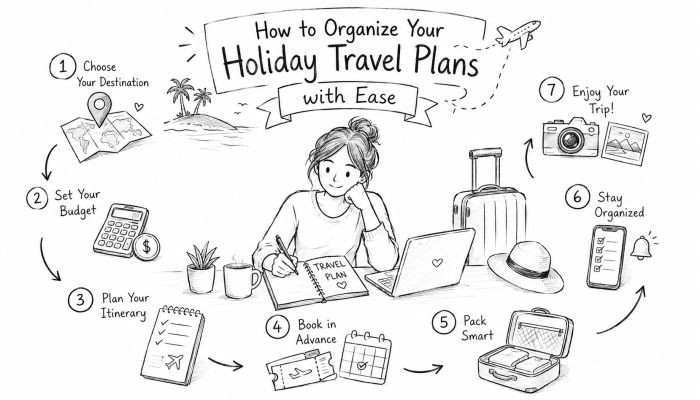 How to Organize Your Holiday Travel Plans with Ease
 The Ultimate Guide to Cooking for a Crowd
 How to Make Healthy Comfort Food Without the Guilt
 5 Delicious Vegan Breakfast Ideas You Can Make in Minutes