How to Create Smart Financial Alerts
Financial management is a relentless game: you can’t keep score if you’re not watching the boards. Financial alerts are a critical tool for helping you stay informed, in‑control and taking action with your money. From budgeting to business expense tracking to investment performance, financial alerts send automated notifications about your accounts, cash flow and other data as they happen. Setup can be as easy as going to your bank or financial app, selecting accounts and events to notify you of, and choosing a channel (text, email, app push). This step‑by‑step guide covers smart financial alerts from start to finish—picking key accounts and events to alert you of, setting thresholds for action, picking channels and best practices to integrate alerts into your broader financial awareness and strategy.
- Understand What Financial Alerts Are and Why They Matter
- Start With Your Financial Objectives
- Choose the Right Accounts and Instruments to Monitor
- Identify the Key Events and Thresholds
- Select the Right Delivery Channels
- Organize Alerts Using Categories and Priorities
- Implement and Configure Alerts on Your Platforms
- Monitor and Adjust Alerts Based on Feedback
- Integrate Alerts into Your Financial Workflow
- Leverage Automation and Smart Tools
- Protect Your Alert System From Security Risks
- Evaluate and Review Your Alert Strategy Regularly
- Conclusion
- More Related Topics
Understand What Financial Alerts Are and Why They Matter
Financial alerts are automated messages sent to you when certain conditions are met in your accounts or financial instruments. Some examples are when your checking account balance dips below a pre‑specified threshold or an investment falls or climbs by a defined percentage. There are a wide range of alerts; XS+1 these are important because they provide timely visibility into your accounts that can help prevent overdrafts, protect against fraud, manage cash flow and other potential gaps or opportunities in real‑time. Smart alerts allow you to be more aware and take action rather than hope for good information.

Start With Your Financial Objectives
You might create alerts for a number of reasons or different accounts. Clarify your financial priorities first so that you can align alerts with those goals. Do you want to avoid overdrafts? Track cash‑flow for a small business? Monitor investment portfolio performance? Each objective may have distinct sets of alerts, events and accounts. For cash‑flow, your alerts might focus on low balances, high‑value or daily transactions; for investments, you might look for big price swings or certain changes or events.
Choose the Right Accounts and Instruments to Monitor
Don’t just alert yourself on everything. Too many alerts create alert‑fatigue. Instead focus on your most important accounts and financial assets. These are likely your primary checking, savings and credit card accounts as well as your recurring bills, and any investments that are material to your overall portfolio. For example, your checking account might get low‑balance alerts but a large investment holding might get both sell‑price and sector‑swing alerts. This way alerts are focused where they are most important.
Identify the Key Events and Thresholds
Decide which events trigger an alert and set thresholds. This could be account or asset‑specific events such as low balances (below $500, say), high‑value transactions (greater than $1,000, say), stock price moves (10% drop or gain), bill due dates, unusual login attempts, withdrawal spikes or investment events such as dividend announcements. centralbank.net+1 You might also use behavioral or calendar‑based triggers for bill payments or budget‑reset dates. Choose thresholds that provide useful notification, but aren’t so high or low as to create noise.
Select the Right Delivery Channels
Choose channels to receive your alerts on. SMS and text are ideal for urgent, real‑time notifications, and email can be good for record keeping. Push notifications within financial apps can be highly visible and convenient on your smartphone and many services allow multiple channels to an account or instrument. bankfmb.com Select the channel you are most likely to review and are comfortable with. You can also set priority levels (SMS as high priority, say, or email as lower) for different alerts.
Organize Alerts Using Categories and Priorities
Alerts will become more useful and actionable when organized by category and priority. Set up relevant categories for your financial accounts and activities: “Security” or “Fraud Risk”, “Cash Flow”, “Investments” and “Payments” are good categories. Assign color‑coded priority levels for alerts in those categories such as red for high, yellow for medium and green for low. This will help with alert processing, filtering and responding to alerts in a high‑level view.
Implement and Configure Alerts on Your Platforms
Setting up alerts is as simple as logging into your bank, credit union or investment platform and accessing the “Manage Alerts” or equivalent function. Then, you can select accounts/instruments to monitor, pick alerts to configure, set thresholds, choose channels and toggle alerts on. bankfmb.com Setting up notifications is usually straightforward with drop‑down options. Note: pay attention to notification permissions, make sure the app’s push, SMS or email can send and go in the account security settings.
Monitor and Adjust Alerts Based on Feedback
Monitoring alerts live is critical to success. You will learn whether the frequency, threshold or channel are appropriate or not. Are you frequently dismissing low balance alerts because you deposit before a real risk? Too many daily transactions noise you out of critical alerts? Receiving high urgency fraud alerts when you forget to update your travel notification? Iterating to fine‑tune your alert configurations will ensure your system is optimized for your needs.
Integrate Alerts into Your Financial Workflow
Notifications should be acted on as a first step in your financial management workflow. Set a schedule (daily or weekly) to follow‑up on alerts, reconcile what happened, and reflect on cash flow or investment performance as needed. These notifications are triggers for action. Consider keeping your budget up to date after a cash‑flow alert, recording a recurring bill after a payment alert, adjusting investments for price or profit alerts or transferring between accounts after a low‑balance alert. Alerts become part of an integrated financial workflow over time.
Leverage Automation and Smart Tools
Basic alerts and notifications are great but if you’re looking to go deeper with cash flow and investments then there are tools to leverage. Explore possibilities of smart triggers: for instance, some tools allow you to automatically move money between accounts (savings to checking or vice versa) when a low‑balance alert is received. Others integrate with budget or investment tracking tools and can send tax alerts. Once you have alerts setup, see what other advanced systems are available and whether they can fit into your financial management routines.
Protect Your Alert System From Security Risks
Financial alerts often involve sensitive information and can trigger critical actions. Your alert system needs security as well as vigilance. Make sure your passwords are strong, use two factor wherever possible, and keep contact information updated. Periodically review your alert settings and who receives notifications for your accounts: if there are changes you didn’t make, it could indicate account takeover. If your alert setup isn’t secure, not only can you lose the tools but you could lose your accounts.
Evaluate and Review Your Alert Strategy Regularly
Finances and financial priorities can change over time, for better or for worse. Annual raises, new credit cards, stock splits, tax‑deductible accounts, lifestyle changes, becoming a landlord or other business owner… new accounts and events and require alerts and management. Set a regular review schedule, perhaps quarterly, to re‑evaluate: does your alert strategy still reflect your current needs? Are there new accounts you should add? Is there duplication? Consistent review of your strategy will help your alert setup remain agile and effective over time.
Conclusion
Smart financial alerts are a simple but powerful tool to achieve financial awareness and control. Understanding the what and why of financial alerts, connecting them to your objectives, choosing the right events and accounts to monitor, channels and priority, embedding in workflows, and integrating with a broader financial habit will turn traditional account monitoring into active financial management. Periodically re‑evaluating your system and being vigilant about security will also maintain performance. Financial management is a dynamic and active process; alerts help you stay informed, in control and ready to act.
 Big O Notation Explained for Beginners
 AI in Gaming: Smarter NPCs and Environments
 Understanding Bias in AI Algorithms
 Introduction to Chatbots and Conversational AI
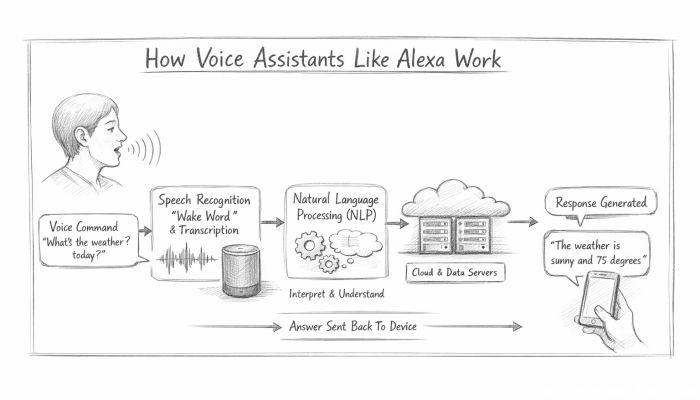 How Voice Assistants Like Alexa Work
 Federated Learning: AI Without Sharing Data