How to Manage Multiple Accounts on Your Mobile
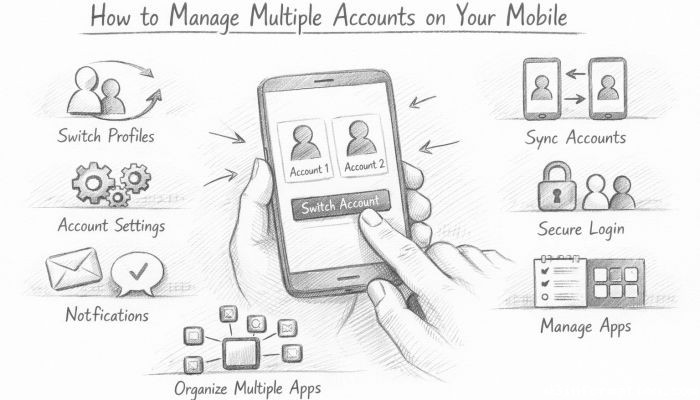
In today’s fast-paced digital world, managing multiple accounts on a mobile device has become a common necessity. Whether juggling between personal and professional emails, social media profiles, or messaging apps, having seamless control over multiple accounts can enhance productivity and simplify communication. However, the complexities of switching between accounts, receiving notifications, and maintaining privacy often leave users overwhelmed. This article aims to provide a comprehensive guide on effectively managing multiple accounts on your mobile device. From built-in features and app-specific solutions to third-party tools and best practices in security, we will explore how to streamline account management on both Android and iOS platforms. Whether you’re an individual overseeing personal and work life or a social media manager handling various client accounts, these strategies will help you stay organized and in control.
- Understanding the Need for Multiple Account Management
- Built-In Account Switching Features on Mobile OS
- Using Multiple User Profiles on Android
- Dual App Feature for Cloning Applications
- Utilizing Third-Party Multi-Account Apps
- Managing Email Accounts Efficiently
- Social Media Account Management Tips
- Secure Password and Authentication Handling
- Notifications Management for Multiple Accounts
- Organizing Accounts with Folder and App Arrangement
- Backup and Sync Considerations
- Troubleshooting Common Issues with Multiple Accounts
- Future Trends in Multi-Account Mobile Management
- Conclusion
- More Related Topics
Understanding the Need for Multiple Account Management
In an era where digital personas extend across various applications and services, having more than one account per platform is increasingly common. People maintain different email IDs for work and personal use, multiple social media profiles for different audiences, and varied messaging accounts to communicate within distinct groups. Managing these accounts separately without confusion or overlap is crucial to avoid missed communications and maintain privacy boundaries. Recognizing the need for effective multi-account management is the first step towards setting up your mobile device to cater to those requirements smoothly.
Built-In Account Switching Features on Mobile OS
Both Android and iOS offer built-in functionalities to help users manage multiple accounts within certain apps. For instance, Android allows users to add multiple Google accounts which sync with Gmail, Google Drive, and Calendar apps. Similarly, iOS supports Apple ID account switching within key Apple services. Many apps like Gmail and YouTube natively support multi-account login where users can effortlessly switch between profiles without signing out. Familiarizing yourself with these native switching options can simplify everyday multitasking on your phone.
Using Multiple User Profiles on Android
Android devices go a step further by enabling multiple user profiles on one device. This essentially creates separate workspaces with distinct apps, accounts, and data. Users can toggle between profiles just like switching users on a PC. For those who want absolute separation between work and personal environments, this feature is invaluable. Setting up a secondary user profile can prevent accidental cross-over of information and preserve privacy. However, iOS currently lacks this multi-profile system, making Android a preferred choice for some multi-account users.
Dual App Feature for Cloning Applications
Many Android manufacturers like Samsung, Xiaomi, and OnePlus offer a “Dual Apps” or “App Cloning” feature. This allows users to run two instances of the same app, each signed into a different account. For example, you can have two WhatsApp apps on your phone, one for personal use and one for work, each with its own phone number and message history. This method is particularly useful for apps that do not support multiple accounts within their interface. Cloning apps provide practical flexibility for users who rely heavily on social media or messaging services.
Utilizing Third-Party Multi-Account Apps
Third-party applications designed for multi-account management are another effective solution. Apps like Parallel Space, Dual Space, and Shelter offer app cloning and account switching capabilities across a variety of services. These apps create virtual spaces isolating individual instances of accounts, ensuring data is not mixed. However, it’s important to review permissions and privacy policies of third-party apps before installation. When configured properly, these tools can extend the functionality of your mobile device and help keep work and personal life balanced.
Managing Email Accounts Efficiently
Email management is one of the most common reasons people juggle multiple accounts. Both Android and iOS mail apps support adding multiple email providers like Gmail, Outlook, Yahoo, and others. Consolidating these accounts within one app allows users to read, respond, and organize messages seamlessly without logging in and out constantly. Features like unified inboxes, customizable notifications, and smart filters further improve account handling. Identifying the optimal email client app for your workflow and setting it up with all your accounts will dramatically cut down on email-related friction.
Social Media Account Management Tips
For social media enthusiasts and professionals managing multiple profiles, switching accounts smoothly is essential. Many platforms, including Instagram, Twitter, and Facebook, allow users to add and toggle between several accounts without logging out. Additionally, social media management tools like Hootsuite or Buffer enable centralized posting and analytics from multiple accounts. Leveraging these built-in and external tools helps avoid posting errors, maintain consistent branding, and monitor audience engagement across different channels.
Secure Password and Authentication Handling
Managing multiple accounts also means managing multiple credentials. Using the same password across accounts increases security risks, while remembering tens of unique passwords is challenging. Password managers like LastPass, 1Password, or the built-in password vaults of iOS and Android can securely store and auto-fill your login details. Implementing two-factor authentication (2FA) across your accounts adds an extra security layer, keeping your personal and professional data safe from unauthorized access. Regularly updating passwords and monitoring account activity are best practices to maintain account integrity.
Notifications Management for Multiple Accounts
When multiple accounts are synchronized on one device, notification overload can disrupt productivity. It’s important to customize notification settings to prioritize important alerts. Both Android and iOS allow users to fine-tune notifications at the app and account level. Muting less critical accounts during work hours or grouping notifications can reduce distractions. Using “Do Not Disturb” modes and notification summary features helps maintain focus without missing essential communications.
Organizing Accounts with Folder and App Arrangement
Proper organization of apps that host multiple accounts or clones can enhance usability. Group apps into folders named according to their purpose or account type, such as “Work Email,” “Personal Social,” or “Client Messaging.” Using distinct app icons, if supported, can also visually differentiate cloned apps or different profiles. Customizing your mobile home screen layout to reflect account categories ensures quick access and reduces the risk of mixing contexts.
Backup and Sync Considerations
Ensuring data from multiple accounts is regularly backed up and synchronized is essential to avoid loss and maintain continuity. Most email and cloud storage providers offer automatic sync features, which should be enabled for each registered account. For cloned apps or third-party multi-account platforms, it is advisable to confirm backup capabilities, as some virtual accounts might not sync data to the cloud by default. Periodic manual backups and reviews of sync settings prevent account data fragmentation or loss.
Troubleshooting Common Issues with Multiple Accounts
Managing several accounts simultaneously on a mobile device can sometimes lead to glitches such as login errors, notification delays, or app crashes. Common fixes include clearing app caches, updating apps to the latest versions, and restarting the device. For account-related problems, removing and re-adding the account can resolve sync issues. If problems persist, consulting the app’s help resources or contacting support often provides dedicated solutions. Keeping your device’s operating system up-to-date also minimizes compatibility issues when juggling multiple accounts.
Future Trends in Multi-Account Mobile Management
As mobile technology evolves, so do the tools for multi-account management. Artificial intelligence is beginning to play a role in smarter notification filtering and account activity predictions, enhancing user experience. Integration of wearable devices and voice assistants can further streamline switching between accounts hands-free. Additionally, growth in unified communication platforms promises simplified multi-account conversations under one interface. Staying updated with these trends will empower users to manage their digital identities more efficiently in the future.
Conclusion
Effectively managing multiple accounts on a mobile device is no longer a luxury but a necessity in our interconnected world. Whether through native OS features, app cloning capabilities, or third-party solutions, there are diverse tools available to simplify this process. Key to success is understanding your specific needs, maintaining security best practices, and organizing accounts thoughtfully to prevent overlap. As mobile devices become central to both work and life, mastering multi-account management enhances productivity, keeps communication clear, and protects privacy. Embracing these techniques today prepares you for efficient digital multitasking tomorrow.
 How to Make the Most of Your Holiday Break
 The Best Winter Destinations for a Cozy Getaway
 How to Organize Your Holiday Travel Plans with Ease
 The Ultimate Guide to Cooking for a Crowd
 How to Make Healthy Comfort Food Without the Guilt
 5 Delicious Vegan Breakfast Ideas You Can Make in Minutes