How to Choose the Right Mobile for Your Child
In today’s digitally connected world, giving a mobile phone to a child is almost a rite of passage. Whether for staying in touch during emergencies, educational purposes, or simply for entertainment, mobile phones have become an essential tool for kids as young as elementary school age. However, choosing the right mobile for your child is not as straightforward as picking the latest model off the shelf. Parents must carefully weigh factors like age-appropriateness, safety features, durability, and budget while navigating the vast array of options. This article serves as a comprehensive guide for parents and guardians in selecting a mobile phone that balances functionality, protection, and ease of use tailored specifically to the unique needs of their child.
- Understanding Your Child’s Needs and Maturity Level
- Setting a Realistic Budget
- Choosing Between Basic Phones and Smartphones
- Prioritizing Safety and Privacy Features
- Importance of Durable and Child-Friendly Design
- Screen Size and Display Type Considerations
- Evaluating Battery Life and Charging Options
- Assessing App Ecosystem and Educational Value
- Considering Network Restrictions and Connectivity
- Check for Emergency and Location Features
- Reviewing User Interface and Usability for Children
- Considering Connectivity with Family Devices
- Final Thoughts on Choosing the Right Mobile for Your Child
- More Related Topics
Understanding Your Child’s Needs and Maturity Level
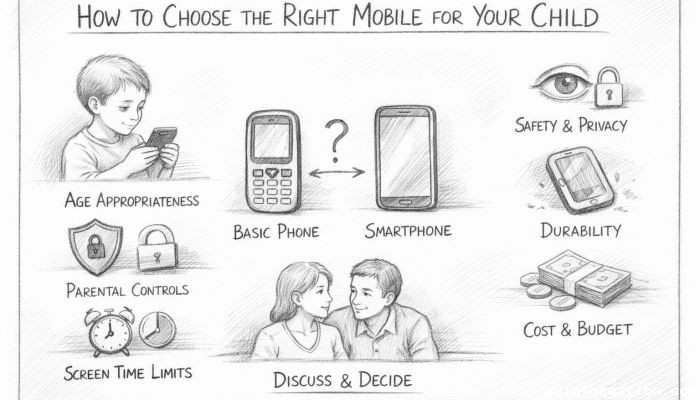
The first step in choosing a mobile for your child is to assess their maturity and needs. Younger children might only need a basic phone with calling and texting capabilities, while older kids may require smartphones for educational apps, social connectivity, or creative expression. Evaluating how responsible your child is with gadgets—including their ability to follow rules around screen time and data usage—is paramount. Additionally, discussing the purpose of the phone with your child can help set expectations and encourage responsible usage from the outset.
Setting a Realistic Budget
Mobile phones come in a wide range of prices, from budget-friendly basic devices to expensive flagship smartphones. Setting a budget helps narrow down options and prevents overspending on features your child may not use or even understand. Consider not only the initial cost of the phone but also recurring expenses such as data plans, protective cases, and apps. For younger children, a lower-cost phone might be suitable, reducing the risk of costly loss or damage.
Choosing Between Basic Phones and Smartphones
Basic phones typically offer calling, texting, and sometimes simple games and cameras, while smartphones provide internet access, app downloads, GPS, and multimedia features. While smartphones unlock numerous educational and communication opportunities, they also expose children to potential risks like inappropriate content and excessive screen time. Parents should weigh the benefits against the risks and decide which type aligns better with their child’s age, maturity, and family rules.
Prioritizing Safety and Privacy Features
Safety is a top concern for any parent. Look for phones that offer parental control settings enabling you to monitor and regulate usage. Features like location tracking, app restrictions, and call blocking can provide peace of mind. Many smartphones now include built-in parental controls, but supplemental apps can also help enforce limits. Additionally, consider a phone that does not store excessive personal data or requires minimal personally identifiable information.
Importance of Durable and Child-Friendly Design
Children’s phones must be built to survive drops, spills, and rough handling. Phones with reinforced frames, shatterproof screens, and water resistance will withstand the inevitable bumps and tumbles. Some devices come with rugged, rubberized exteriors or customizable covers that make them easier for small hands to grip. Durability prevents frustrating replacements and ensures continuous use during active play or school days.
Screen Size and Display Type Considerations
The phone’s screen size affects usability and portability. Smaller screens are easier for young children to manage but may strain eyes if used for long periods. Larger screens enhance viewing but can be cumbersome for little hands and increase the risk of damage if dropped. Additionally, choosing devices with blue light filters or low-brightness modes can protect a child’s developing eyes.
Evaluating Battery Life and Charging Options
Long battery life ensures the phone stays functional throughout school or outings, minimizing the chance of losing contact. Phones with efficient processors and energy-saving settings often last longer. Fast-charging capabilities are a plus for parents pressed for time. Also consider whether the phone uses common charging ports like USB-C or proprietary ones, as this affects replacement or spare charger availability.
Assessing App Ecosystem and Educational Value
For smartphones, the availability of educational apps and safe content platforms is critical. Both Android and iOS offer parental control-compatible app stores. Seek devices that support apps promoting learning, creativity, and development while restricting exposure to inappropriate material. Apps that assist with homework, languages, or coding can make screen time more productive.
Considering Network Restrictions and Connectivity
Depending on how much independence you want to grant your child, consider phones that offer limited network connectivity. Some phones operate on limited SMS and voice call capabilities without full internet access. Alternatively, devices with eSIM functionality or prepaid plans provide more control over data usage and spending. Understanding the network infrastructure helps avoid unexpected charges and limits exposure to online risks.
Check for Emergency and Location Features
One key reason parents provide mobiles to kids is for safety. Choose phones with emergency call functionality that can dial pre-set numbers quickly. GPS tracking features allow parents to locate their children, which can be set to share only during specific hours or locations to respect privacy. Some phones also offer geo-fencing alerts that notify parents if children wander outside designated safe zones.
Reviewing User Interface and Usability for Children
The phone’s interface should be intuitive and age-appropriate. Devices designed for children often have simplified menus, larger icons, and easy navigation to prevent frustration. Voice commands or customizable home screens tailored to a child’s favorite apps can enhance comfort and independence. Avoid overly complicated systems that can confuse or discourage young users.
Considering Connectivity with Family Devices
Compatibility with other family devices can enhance monitoring and communication. For example, some phones work seamlessly with parental apps on parents’ smartphones, allowing message monitoring and usage reports. Family sharing features let parents manage apps and media content. Consider whether the phone’s operating system aligns with your existing gadgets to maximize interoperability.
Final Thoughts on Choosing the Right Mobile for Your Child
Choosing the right mobile phone for your child is a decision that involves balancing connectivity, safety, functionality, and cost to fit your family’s values and your child’s developmental stage. There is no one-size-fits-all solution, but a thoughtful approach ensures your child gains the benefits of mobile technology while minimizing the risks. By starting with your child’s needs and progressing through safety features, usability, and network considerations, you can find a device that supports healthy digital habits and strengthens family communication. As technology evolves, staying informed and maintaining ongoing conversations with your child will help adapt your choices to meet changing needs.
 How to Make the Most of Your Holiday Break
 The Best Winter Destinations for a Cozy Getaway
 How to Organize Your Holiday Travel Plans with Ease
 The Ultimate Guide to Cooking for a Crowd
 How to Make Healthy Comfort Food Without the Guilt
 5 Delicious Vegan Breakfast Ideas You Can Make in Minutes