Big O Notation Explained for Beginners
In the world of computer science and programming, understanding how algorithms perform is essential to writing efficient and scalable code. Whether you’re a student learning your first programming language or a professional developer refining complex applications, grasping the concept of algorithmic complexity will empower you to make smarter decisions in your coding journey. Big O notation serves as the universal language used to describe the efficiency of algorithms, particularly in terms of time and space requirements. This mathematical notation goes beyond simply counting steps—it helps us predict how an algorithm's performance grows as the input size increases, enabling us to understand potential bottlenecks before they arise. In this article, we will break down Big O notation into easily digestible components, covering everything from its basics to practical examples, so that even beginners can approach it with confidence.
- What Is Big O Notation?
- Why Is Big O Important?
- Time Complexity vs Space Complexity
- Common Big O Classifications
- How to Analyze an Algorithm’s Complexity
- Illustrative Example: Linear Search
- Illustrative Example: Binary Search
- Big O and Data Structures
- Common Misconceptions about Big O
- Tips for Using Big O in Practice
- Advanced Concepts: Big Omega and Big Theta
- How Big O Helps in Real-World Application Development
- Conclusion
- More Related Topics
What Is Big O Notation?
Big O notation is a mathematical way to describe the upper bound of an algorithm’s growth rate as the input size gets larger. It provides a standardized framework for comparing the performance of different algorithms, focusing primarily on how quickly the runtime or memory usage increases relative to the input size (usually denoted as *n*). The notation takes the form O(f(n)), where f(n) is a function representing the complexity relative to input size. It answers the question: “How does the algorithm behave as n approaches infinity?” Rather than measuring exact time or steps, Big O simplifies the analysis by ignoring constants and less significant terms, honing in on the dominant factor that determines performance under heavy load.

Why Is Big O Important?
Coding does not simply mean getting the correct answer; it’s also about writing code that finishes efficiently and doesn’t waste resources. Big O notation is crucial because it helps developers understand the scalability of their solutions. An algorithm with a poor Big O classification, such as O(n²), might work fine on small datasets but become unusably slow as data grows. Conversely, an algorithm with a better classification, like O(log n), maintains performance even with massive inputs. By evaluating algorithm complexity early, developers can avoid costly pitfalls in system design, leading to faster programs, better user experiences, and optimized resource consumption.
Time Complexity vs Space Complexity
Big O notation can refer to two different types of resource consumption: time complexity and space complexity. Time complexity deals with how the processing time of an algorithm changes as the input grows, while space complexity concerns the amount of memory or storage used. Both are vital because some algorithms may run quickly but require huge memory overhead, and others may be memory efficient at the expense of speed. Understanding both helps in balancing performance depending on the constraints of the environment—be it a mobile device with limited RAM or a server handling millions of requests.
Common Big O Classifications
Several common forms of Big O classifications frequently emerge in algorithm analysis:
- O(1) – Constant Time: The algorithm takes the same time regardless of input size.
- O(log n) – Logarithmic Time: Performance grows logarithmically, often seen in algorithms that halve the input size each iteration.
- O(n) – Linear Time: Time grows proportionally with input size.
- O(n log n) – Linearithmic Time: Found in efficient sorting algorithms like mergesort and heapsort.
- O(n²) – Quadratic Time: Time grows with the square of input size, common in simple nested loops.
- O(2^n) – Exponential Time: Performance doubles with each additional input, typical of some recursive algorithms.
- O(n!) – Factorial Time: Extremely slow, usually with brute force searches and permutations.
These classifications provide a quick understanding of efficiency and help prioritize algorithm choices.
How to Analyze an Algorithm’s Complexity
Analyzing complexity requires careful examination of the algorithm’s structure. Begin by identifying loops, recursive calls, and statements executed repeatedly relative to input size. For instance, a single loop iterating over *n* elements suggests O(n) complexity. Nested loops multiply complexity (e.g., two loops iterating over n elements result in O(n²)). Recursive algorithms sometimes follow recurrence relations; understanding how many times a function calls itself, and how work is divided or combined at each step, supports calculating Big O. By breaking down the code into these components and focusing on the dominant growth term, one can deduce the algorithm’s complexity.
Illustrative Example: Linear Search
Consider a simple example: searching for an element in an unsorted list by checking each item sequentially—known as linear search. In the worst-case scenario, the algorithm might check every element, resulting in time proportional to the size of the list. This leads to a time complexity of O(n). Linear search is straightforward and requires no extra memory, so its space complexity is O(1). While linear search is easy to implement, it becomes inefficient with large datasets compared to more optimized algorithms.
Illustrative Example: Binary Search
Binary search improves upon linear search by leveraging sorted data. Instead of checking elements one by one, it repeatedly divides the input set in half, discarding the non-relevant half each time. This halving reduces the search space drastically, so the number of steps grows logarithmically with input size—O(log n). Binary search requires sorted input but is significantly faster than linear search for large datasets. The space complexity remains O(1), as the algorithm needs only a few variables for indices and counters.
Big O and Data Structures
Big O notation also applies to data structure operations. For example, accessing an element in an array is O(1), since it requires just direct indexing. Searching for a value in a linked list is O(n) because of sequential traversal. Insertions and deletions vary: inserting at the beginning of a linked list is O(1), inserting in the middle or end may take longer. Hash tables commonly achieve O(1) time for insertions and lookups, assuming good hash functions and minimal collisions. Trees often have logarithmic complexities, such as O(log n) for balanced binary search trees, making it crucial to select appropriate data structures depending on the use case.
Common Misconceptions about Big O
Many beginners misunderstand Big O, often thinking it represents actual running time rather than a growth rate approximation. It’s important to remember that Big O provides an upper bound on performance in the worst case and ignores constant factors and low-order terms. This means an O(n) algorithm might be faster than an O(log n) implementation for small input sizes due to lower overhead. Additionally, Big O doesn’t capture all performance factors such as hardware, compiler optimizations, and caching. It's just one tool among many for evaluating algorithms.
Tips for Using Big O in Practice
When applying Big O notation, be mindful of the context. Always consider the expected input size and specific problem constraints. For small data, a simpler algorithm with worse Big O but fewer constants might be preferable. Profiling and benchmarking complement Big O analysis by providing empirical performance data. Learning to read code with complexity in mind enhances debugging and optimization skills. Lastly, don’t neglect space complexity when memory is limited, and be aware of trade-offs between time and space.
Advanced Concepts: Big Omega and Big Theta
While Big O focuses on the worst-case upper bound, two related notations—Big Omega (Ω) and Big Theta (Θ)—provide additional nuance. Big Omega describes the best-case or lower bound, indicating the minimum time an algorithm can take. Big Theta tightly bounds performance both above and below, meaning the algorithm’s complexity is exactly proportional to the function stated (within constant factors). Understanding these notations helps in getting a fuller picture of an algorithm’s behavior under different scenarios.
How Big O Helps in Real-World Application Development
Big O notation isn’t just academic theory—it directly influences real-world software engineering. In industries where performance and scalability are vital, such as web services, gaming, and machine learning, selecting algorithms and data structures based on their complexity is a necessity. It guides system architects in designing databases, caching layers, and search engines. Awareness of Big O improves code maintainability and responsiveness, leading to better end-user satisfaction. As data amounts grow exponentially, having this knowledge will only increase in importance.
Conclusion
Big O notation is a cornerstone concept that demystifies how algorithms scale with input size and resource constraints. By focusing on growth rates rather than absolute measurements, it provides a useful abstraction for comparing efficiency. From linear and binary searches to complex sorting algorithms, understanding Big O helps you write faster, more memory-efficient programs while anticipating potential performance bottlenecks. Beyond pure computation, it enhances critical thinking around problem-solving in technology. As you advance in your coding career, embracing Big O will equip you with a powerful toolset to tackle challenges with analytical rigor and precision. Remember, efficient code is not just about solving a problem—it’s about solving it well.
 AI in Gaming: Smarter NPCs and Environments
 Understanding Bias in AI Algorithms
 Introduction to Chatbots and Conversational AI
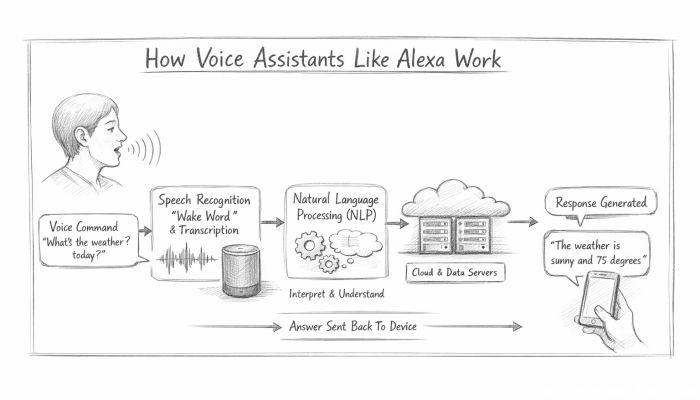 How Voice Assistants Like Alexa Work
 Federated Learning: AI Without Sharing Data